Federated Queries with Amazon Redshift Serverless
AWS Data Engineer Roadmap
Connect Redshift Serverless to S3 (Spectrum) and live Aurora (federated query), then join both in one SQL statement — no data movement.
Chapter 5 of 6 — AWS Data Engineer Roadmap
Welcome! In this chapter you will connect Amazon Redshift Serverless to live and external data, then query it across sources.
- Lab 1 — Query S3 data files using Redshift Spectrum
- Lab 2 — Query a live Aurora PostgreSQL database (Federated Query)
- Lab 3 — Cross-source join: S3 sales + Aurora customers in one query
- Lab 4 — Auto-discover schema with Glue Crawler, then query from Redshift
Everyone shares the same Redshift workgroup. You keep your work separate by putting your student number in every name you create.
You have been assigned a number, e.g. 01, 02, 03 ...
Everywhere you see NN in this handout, replace it with YOUR number.
Example: if you are student 04, then
| Placeholder | Your value |
|---|---|
ext_pg_studentNN | ext_pg_student04 |
ext_s3_studentNN | ext_s3_student04 |
ext_oil_studentNN | ext_oil_student04 |
spectrum_db_studentNN | spectrum_db_student04 |
spectrum_oil_studentNN | spectrum_oil_student04 |
quicklabs-studentNN-curated | quicklabs-student04-curated |
IMPORTANT: Use YOUR number consistently. If two students use the same name, your tables will clash. The instructor uses NN = 00 for the demo.
Connecting to the Query Editor (read this first)
-
Open Amazon Redshift → Query editor v2 in the AWS Console.
-
In the left panel, click the shared workgroup your instructor points you to.
-
A connection dialog appears. Select Federated user — no password needed. Make sure Database shows
dev, then click Create connection.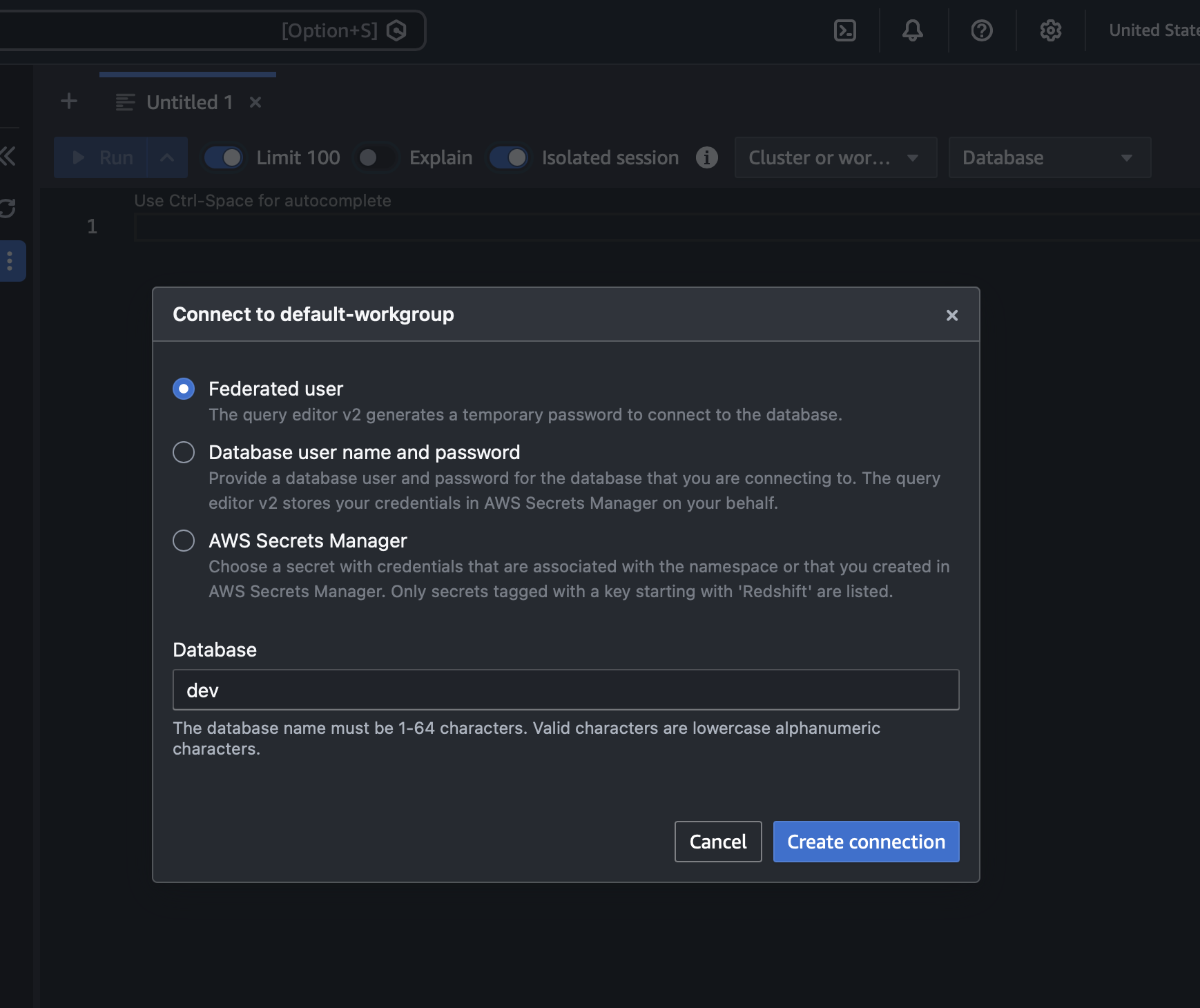
-
Confirm the database at the top is
dev.
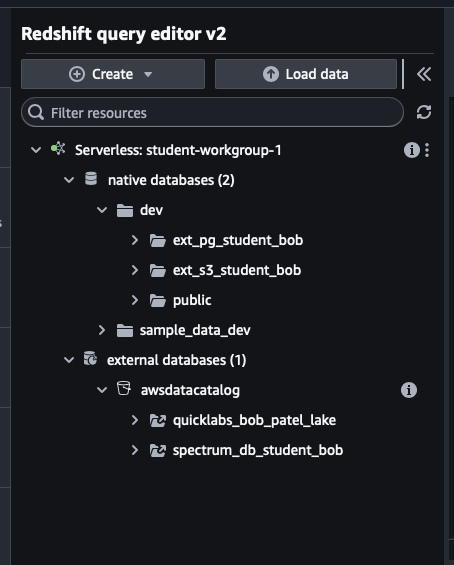
You will see two types of entries in the left catalog tree:
- Native databases — schemas you create live here, under
dev - External databases — the shared AWS Glue Data Catalog
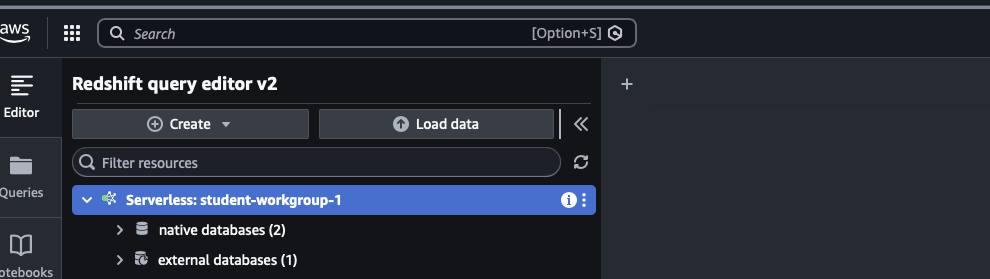
You will see databases that OTHER students created (like spectrum_db_student02). This is normal — the Glue catalog is account-wide. Use YOUR own names and ignore the rest.
Lab 1 — Query S3 Data with Redshift Spectrum
Goal: Create external tables over Parquet files in S3 and query them like normal tables — without loading anything into Redshift.
You will use the TICKIT sample sales data already placed in S3 at: s3://quicklabs-raw-data/tickit/spectrum/sales/
Your instructor will give you:
ROLE_ARN =
Step 1 — Create your external schema
Replace NN with your number. spectrum_db_studentNN must be unique to you.
CREATE EXTERNAL SCHEMA ext_s3_studentNN
FROM DATA CATALOG
DATABASE 'spectrum_db_studentNN'
REGION 'us-west-2'
IAM_ROLE 'ROLE_ARN'
CREATE EXTERNAL DATABASE IF NOT EXISTS;
CREATE EXTERNAL DATABASE IF NOT EXISTS creates your own Glue database named spectrum_db_studentNN automatically.
Step 2 — Create the SALES external table
The data is TAB-separated. Replace NN with your number.
CREATE EXTERNAL TABLE ext_s3_studentNN.sales (
    salesid     INTEGER,
    listid      INTEGER,
    sellerid    INTEGER,
    buyerid     INTEGER,
    eventid     INTEGER,
    dateid      SMALLINT,
    qtysold     SMALLINT,
    pricepaid   DECIMAL(8,2),
    commission  DECIMAL(8,2),
    saletime    TIMESTAMP
)
ROW FORMAT DELIMITED
    FIELDS TERMINATED BY '\t'
STORED AS TEXTFILE
LOCATION 's3://quicklabs-raw-data/tickit/spectrum/sales/'
TABLE PROPERTIES ('numRows'='172000');
Step 3 — Query your S3 data
SELECT * FROM ext_s3_studentNN.sales LIMIT 10;Step 4 — Run an aggregate query
SELECT eventid, SUM(pricepaid) AS total_sales
FROM ext_s3_studentNN.sales
WHERE pricepaid > 30
GROUP BY eventid
ORDER BY total_sales DESC
LIMIT 10;
Check your work: the top three eventid values should be 289, 7895, and 1602.
Step 5 (bonus) — See which S3 file each row came from
SELECT "$path", salesid, pricepaid
FROM ext_s3_studentNN.sales
LIMIT 5;
The $path column shows the exact S3 object behind each row.
Lab 2 — Federated Query to Aurora PostgreSQL
Goal: Run SQL in Redshift that reads a live Aurora PostgreSQL table directly — no data copying, no ETL.
Your instructor will give you:
AURORA_ENDPOINT =
ROLE_ARN        =
SECRET_ARN      =
Step 1 — Create your federated external schema
Replace NN with your number and fill in the three values above.
CREATE EXTERNAL SCHEMA ext_pg_studentNN
FROM POSTGRES
DATABASE 'postgres'
SCHEMA 'public'
URI 'AURORA_ENDPOINT'
PORT 5432
IAM_ROLE 'ROLE_ARN'
SECRET_ARN 'SECRET_ARN';
Step 2 — Query the live Aurora data
SELECT * FROM ext_pg_studentNN.customers LIMIT 10;These rows live in Aurora, not in Redshift. You are reading them live.
Step 3 — Run a real aggregate query
SELECT region, COUNT(*) AS num_customers
FROM ext_pg_studentNN.customers
GROUP BY region
ORDER BY num_customers DESC;
Lab 3 — Cross-Source Join: S3 + Aurora in One Query
Goal: Write a single SQL query that joins S3 sales data (Spectrum) with live Aurora customer data (federated query) — two sources, one result set.
Prerequisite: Labs 1 and 2 must be complete and your schemas must exist.
Query 1 — Revenue by customer region
SELECT
    c.region,
    COUNT(DISTINCT s.salesid)  AS num_sales,
    SUM(s.pricepaid)           AS total_revenue
FROM ext_s3_studentNN.sales      AS s
JOIN ext_pg_studentNN.customers  AS c
    ON s.buyerid = c.id
GROUP BY c.region
ORDER BY total_revenue DESC;
Redshift reads S3 locally via Spectrum and pushes the join predicate down to Aurora via federated query — no data lands in Redshift.
Query 2 — Verify both sources are live
SELECT 'from S3'     AS source, COUNT(*) FROM ext_s3_studentNN.sales
UNION ALL
SELECT 'from Aurora' AS source, COUNT(*) FROM ext_pg_studentNN.customers;
Lab 4 — Auto-Discover Schema with Glue Crawler, Query from Redshift
Goal: Use a Glue Crawler to automatically detect the schema of your curated oil Parquet data (created in the Glue & Athena chapter), register it in the Glue Data Catalog, and query it from Redshift Spectrum — without writing any DDL yourself.
Why this matters: In Lab 1 you hand-wrote the CREATE EXTERNAL TABLE statement. In production, tables change and schemas evolve. A Glue Crawler detects the schema automatically and keeps it current.
Prerequisite: The Glue ETL job from the AWS Data Lake chapter must be complete. Your curated Parquet files must exist at s3://quicklabs-studentNN-curated/oil_curated/.
Step 1 — Create a Glue Crawler
-
Open AWS Glue → Crawlers in the Console.
-
Click Create crawler.
-
Fill in the details:
Field Value Crawler name quicklabs-studentNN-oil-crawlerData source type S3 S3 path s3://quicklabs-studentNN-curated/oil_curated/IAM role Select the pre-provisioned Glue role your instructor provided Target database Click Add database → name it spectrum_oil_studentNNTable name prefix Leave empty Crawler schedule On demand -
Review and click Create crawler.
Step 2 — Run the crawler
- Select your crawler
quicklabs-studentNN-oil-crawler. - Click Run.
- Wait for the Status to change from
RunningtoReady(usually 1–2 minutes).
Step 3 — Inspect what the crawler discovered
-
Go to AWS Glue → Databases →
spectrum_oil_studentNN. -
Click Tables — you should see a table named
oil_curated(or similar, based on the S3 folder name). -
Click the table name and review:
- Schema — columns and types detected automatically from Parquet
- Location — the S3 prefix the table points to
- Classification — should show
parquet
Note the exact table name — you will use it in Step 5.
Step 4 — Create an external schema in Redshift pointing to your Glue database
Back in Redshift Query Editor v2, run:
CREATE EXTERNAL SCHEMA ext_oil_studentNN
FROM DATA CATALOG
DATABASE 'spectrum_oil_studentNN'
IAM_ROLE 'ROLE_ARN'
REGION 'us-west-2';
Use the same ROLE_ARN as Labs 1 and 2.
Step 5 — Query your crawler-discovered table
Replace oil_curated with the exact table name the crawler created if different.
SELECT * FROM ext_oil_studentNN.oil_curated LIMIT 10;You should see crude oil price rows — the same data you transformed with your Glue ETL job, now queryable from Redshift without any DDL.
Step 6 — Run analytics queries
Average closing price by year:
SELECT
    year,
    ROUND(AVG(close), 4) AS avg_close,
    ROUND(MIN(close), 4) AS min_close,
    ROUND(MAX(close), 4) AS max_close,
    COUNT(*)             AS trading_days
FROM ext_oil_studentNN.oil_curated
GROUP BY year
ORDER BY year;
Highest-volume months:
SELECT
    year,
    month,
    SUM(volume)          AS total_volume,
    ROUND(AVG(close), 4) AS avg_close
FROM ext_oil_studentNN.oil_curated
GROUP BY year, month
ORDER BY total_volume DESC
LIMIT 10;
Step 7 (bonus) — Confirm the crawler table and your manual table agree
In Lab 1 you created ext_s3_studentNN.sales by hand. In this lab, the crawler built the table definition for you. Confirm both paths return the same row count:
-- Crawler-discovered table (oil data)
SELECT 'crawler-discovered' AS method, COUNT(*) AS rows
FROM ext_oil_studentNN.oil_curated

UNION ALL

-- Hand-written DDL (sales data from Lab 1)
SELECT 'manual DDL' AS method, COUNT(*) AS rows
FROM ext_s3_studentNN.sales;
Both rows should return counts. The point: the crawler saved you from writing the Parquet column definitions yourself — it read them from the file metadata.
Troubleshooting
| What you see | What to do |
|---|---|
| "schema … already exists" | Someone (maybe you) used that name. Use your own NN. |
| "authentication method 10 not supported" | Tell instructor — Aurora user needs md5 password encoding |
| Glue / CreateDatabase not authorized | Tell instructor — IAM role not attached to Redshift namespace |
| S3 access denied / 0 rows from Spectrum | Check the LOCATION path ends with / and matches your bucket exactly |
| "relation does not exist" | Wrong schema name — check your NN matches what you created |
| Crawler status stays "Running" > 5 min | Check the S3 path is correct and the IAM role has S3 read access |
| Crawler creates 0 tables | The S3 path is empty — confirm the Glue ETL ran successfully first |
| External schema already exists after crawler | Drop it: DROP SCHEMA ext_oil_studentNN then re-run Step 4 |
To reset any lab, drop your schema:
DROP SCHEMA ext_s3_studentNN;
DROP SCHEMA ext_pg_studentNN;
DROP SCHEMA ext_oil_studentNN;
What you learned
- Spectrum: Redshift queries Parquet/CSV files in S3 as external tables — no data movement.
- Federated query: Redshift reads a live PostgreSQL (Aurora) database in real time — no copy.
- Cross-source join: A single SQL statement can join data from S3 and a live RDS database simultaneously.
- Glue Crawler: Automatically detects schema from S3 files and registers tables in the Glue Data Catalog — eliminates hand-written DDL and keeps schemas current as data evolves.
- External schemas are your namespace in Redshift; the Glue databases behind them are account-wide — that's why you see everyone's in the catalog.
- One Redshift workgroup serves many users — isolation comes from consistent naming with your own NN.
Want to bring this to your team? Book a free 30-minute call for consultation or a custom workshop/training.
Book a Free ConsultationI publish new labs every week.
Get them in your inbox — free, no spam.
Want your team hands-on with this in a day? We run this as an instructor-led team workshop.
Explore team workshops