Text-to-SQL on Databricks Lakebase: A Reference Architecture with db-agent, Unity Catalog, and Self-Hosted vLLM
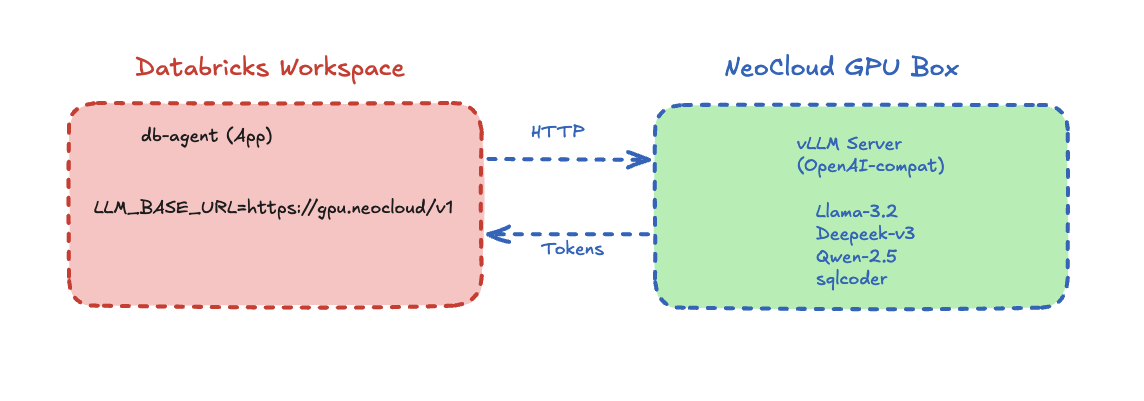
A working reference architecture for a text-to-SQL AI agent that joins Databricks Lakebase (Postgres OLTP) and Unity Catalog Delta (OLAP) through Lakehouse Federation, with a pluggable LLM endpoint that can run on Databricks Model Serving, OpenAI, or self-hosted vLLM on a neo-cloud GPU.
TL;DR — This post walks through a working reference architecture for a text-to-SQL AI agent that runs against two Databricks data planes at once: Lakebase (managed Postgres OLTP) and Unity Catalog Delta (OLAP). The agent — db-agent — is open source, was presented at AAAI-25, and ships a Databricks-Apps deployment variant. The LLM endpoint is deliberately decoupled: you can point it at Databricks Model Serving, an OpenAI-compatible API, or a self-hosted vLLM instance running on any neo-cloud GPU box. The companion quick-lab takes you from raw Olist e-commerce CSVs to a working text-to-SQL agent that can join live OLTP rows with pre-aggregated gold tables in a single query — without writing the SQL by hand.
This is the on-ramp post — the thing engineers should read before they reach for Genie or Agent Bricks, so that when they do, they know exactly what those products are doing under the hood.
Why this architecture, and why now
Three things hit production AI engineers at the same time in 2026:
- Lakebase is GA. Databricks now ships managed Postgres as a first-class compute resource alongside Delta. That means the same workspace holds your OLTP source-of-truth and your OLAP gold layer, and you can join them through Lakehouse Federation.
- Text-to-SQL crossed the "good enough" line. Modern instruction-tuned models — Llama 3.3 70B, GPT-4o, Grok-3, DeepSeek-V3 — generate correct, schema-aware SQL on real catalogs the majority of the time, if you feed them the schema cleanly and validate what comes back.
- GPU economics broke open. Self-hosted inference on neo-clouds (Shadeform, RunPod, Lambda, Crusoe, Vast, Together, Fireworks) is now 3–10× cheaper per token than first-party model serving for steady-state traffic. The bottleneck isn't capability — it's wiring.
The architecture below is what you build when you want to take all three seriously without locking into a single vendor's agent layer.
The full picture
Here's the system end-to-end. Read this once; the rest of the post zooms into each layer.
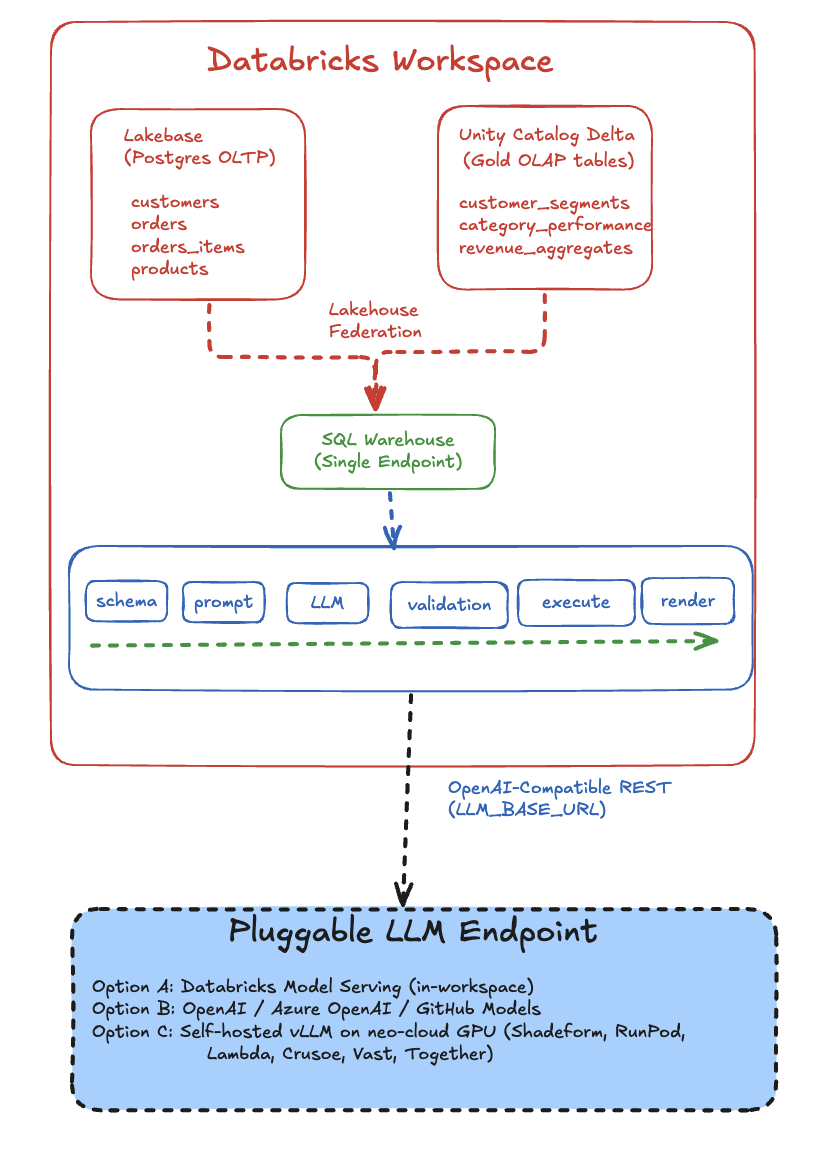
Three things to notice before we go deeper:
- The data is in two places, but the agent sees one SQL endpoint. Lakehouse Federation does the heavy lifting; db-agent doesn't know or care that one table is Postgres and the next is Delta.
- The agent is a deterministic pipeline, not an autonomous loop. It does five things in order — schema → prompt → LLM → validate → execute — and never recurses. That makes it auditable.
- The LLM is on the other side of an HTTP boundary. That single hop is what makes this architecture neo-cloud-ready: swap the URL, keep everything else.
Layer 1 — The data foundation: Lakebase + Unity Catalog
Most "text-to-SQL on Databricks" demos point the agent at a single Delta schema. That's fine for a demo. It misses the point of having Lakebase in the same workspace.
The companion lab loads the Olist Brazilian e-commerce dataset twice on purpose:
   data/raw/*.csv  (Olist customers, orders, items, products, payments)
        │
        │
        ├─► load_oltp.py ─────► Lakebase Postgres
        │                       (5 normalized tables, the source of truth)
        │
        ├─► data/processed/*.csv (cleaned, dedup'd)
        │
        └─► UC Volume → build_olap.py ─► Unity Catalog Delta
                                          (gold aggregates: customer_segments,
                                           category_performance, revenue_aggregates)
Why both? Because real text-to-SQL workloads ask two kinds of questions:
| Question shape | Best answered from |
|---|---|
| "What's the status of order 12345 right now?" | OLTP — Lakebase (live, transactional) |
| "Which customer segment drove the most revenue last quarter?" | OLAP — Unity Catalog gold tables (pre-aggregated) |
| "List recent orders from high-value customers shipped last week" | Both — federation join |
The third row is where Lakehouse Federation earns its keep:
SELECT
  pg.order_id, pg.order_status, pg.order_purchase_timestamp,
  cs.segment, cs.total_spent
FROM lakebase_olist.public.orders             pg     -- Lakebase Postgres (live)
JOIN db_agent_lakebase.olap.customer_segments cs     -- Unity Catalog Delta (gold)
  USING (customer_id)
WHERE pg.order_status IN ('shipped', 'invoiced')
  AND cs.segment = 'high';
That query crosses two data planes in a single statement. The agent doesn't construct that join manually — it just sees one schema graph from INFORMATION_SCHEMA.COLUMNS, generates SQL against it, and the SQL Warehouse routes the OLTP-side rows over the federation connection at execution time.
Federation gotchas worth pre-empting
Three things will eat half a day if you don't know them in advance:
OPTIONS (database '…')lives on the foreign catalog, not the connection. TheCREATE CONNECTION ... TYPE postgresqlstatement only takeshost,port,user,password,trustServerCertificate. The database name goes onCREATE FOREIGN CATALOG.- Default Lakebase database is
databricks_postgres. Unless you explicitlyCREATE DATABASE olist;and re-export yourLAKEBASE_URL, your tables land there. Mismatch = emptySHOW TABLES. - Use a Databricks PAT as the Lakebase password. Lakebase's short-lived
generate-credentialtokens expire in ~1 hour and silently rot the federation connection. PATs let you control rotation explicitly.
Each of those cost me real time. They're documented in the lab README so you can skip the discovery phase.
Layer 2 — The agent pipeline
Here's the inner loop. It's intentionally boring.
   user question
        │
        ▼
   ┌──────────────────────┐
   │ get_schema()         │  ← INFORMATION_SCHEMA.COLUMNS, cached
   └──────────┬───────────┘
              │
              ▼
   ┌──────────────────────┐
   │ build_user_prompt()  │  ← schema text + question → LLM prompt
   └──────────┬───────────┘
              │
              ▼
   ┌──────────────────────┐
   │ call_llm()           │  ← OpenAI-compatible POST, anywhere
   └──────────┬───────────┘
              │
              ▼
   ┌──────────────────────┐
   │ parse_sql_response() │  ← strict JSON → SQLResponse(sql, explanation)
   └──────────┬───────────┘
              │
              ▼
   ┌──────────────────────┐
   │ validate_sql()       │  ← SELECT-only guardrail. BLOCKS here if unsafe.
   └──────────┬───────────┘
              │ (only if safe)
              ▼
   ┌──────────────────────┐
   │ run_query()          │  ← Databricks SQL driver, LIMIT 100
   └──────────┬───────────┘
              │
              ▼
   PipelineOutput(
     question, schema_context,
     sql_response, validation,
     columns, rows, error
   )
The whole orchestrator is ~60 lines of Python (pipeline.py). The pipeline never raises — every error is captured into PipelineOutput.error so the UI shows a friendly message and you can keep iterating.
Why a pipeline and not an autonomous agent loop? Two reasons:
- Auditability. Every question produces exactly one LLM call, one SQL statement, and one execution. You can log the triple and replay it. That's invaluable when a stakeholder says "why did it return that number on Tuesday?"
- Cost predictability. No agent loops, no tool-call recursion, no surprise $200 LLM bill. Each user turn is bounded.
There's a place for the autonomous-loop variant — the db-agent repo has a separate module for that. For text-to-SQL specifically, pipelines win on the metrics that matter to ops teams.
Layer 3 — The safety guardrail
This is the part people skip in demos and regret in production.
Every SQL string the LLM produces is validated before it touches the warehouse. The validator is ~30 lines and applies four rules in cheapest-to-most-informative order:
# sql_safety.py
_FORBIDDEN = {
    # Standard write / DDL
    "DROP", "DELETE", "UPDATE", "INSERT", "ALTER",
    "TRUNCATE", "CREATE", "REPLACE", "MERGE", "EXEC", "EXECUTE",
    "GRANT", "REVOKE", "ATTACH", "DETACH",
    # Databricks / Delta-specific maintenance
    "OPTIMIZE", "VACUUM", "ZORDER", "COPY",
}

def validate_sql(sql: str) -> ValidationResult:
    1. must not be blank
    2. must be a single statement (no mid-string semicolons)
    3. must start with SELECT or WITH
    4. must not contain any forbidden keyword (regex word-boundary)
A few choices worth defending:
OPTIMIZE,VACUUM,ZORDER,COPYare Databricks-specific. They aren't in OWASP's SQL injection list because they don't exist outside Delta. They are destructive enough that a hallucinating LLM should never get to issue them. Generic SELECT-only validators miss this.- Word-boundary regex (
\bDELETE\b), not substring match. Otherwise you reject legitimate queries that containdeleted_atcolumns, products namedDROP, or comments mentioning the wordupdate. WITH ... SELECTis allowed. Common-table expressions are read-only and the LLM produces them frequently for window functions over the OLAP gold tables.- Result set capped at 100 rows in the connector. The validator doesn't enforce row limits — that's the connector's job — but together they prevent the "agent dumped 50M rows into the UI" failure mode.
This isn't a perfect guardrail. A truly adversarial prompt could probably find a phrasing the validator misses. But this isn't an adversarial setting — this is the day-1 wedge between "the LLM produced confident-looking SQL" and "the LLM produced confident-looking SQL and we ran it on production." Closing that gap by 99% with 30 lines of code is a defensible engineering tradeoff.
If you want a deeper guardrail layer, the next step is parser-based validation (sqlglot, sqlparse) that confirms the AST is Select only and the referenced tables are in an allow-list. The repo has a deeper safety module for that pattern.
Layer 4 — The pluggable LLM endpoint (where neo-clouds fit)
The single most important architectural choice in this whole stack is that the LLM lives behind an OpenAI-compatible HTTP endpoint, configured by one environment variable:
# app.yaml — Databricks App config
env:
  - name: "LLM_BASE_URL"
    value: "https://models.github.ai/inference"   # ← swap this
  - name: "LLM_MODEL"
    value: "openai/gpt-4o"
That's the entire integration surface. Three concrete deployments work without touching application code:
Option A — Databricks Model Serving (in-workspace)
LLM_BASE_URL: https://{workspace}/serving-endpoints
LLM_MODEL:    databricks-meta-llama-3-3-70b-instruct
Auth is automatic via the app's service principal. No external secrets. Use this when latency-to-data matters and your billing already lives in Databricks.
Option B — Hosted API (OpenAI / Azure / GitHub Models)
LLM_BASE_URL: https://api.openai.com/v1
LLM_MODEL:    gpt-4o-mini
Secret comes from a Databricks Secret Scope; config.py reads it via the SDK at startup. Use this for prototyping, frontier-model access, or when you don't want to operate inference yourself.
Option C — Self-hosted vLLM on a neo-cloud GPU
This is the option that opens the partnership story. The companion lab includes a vllm/ directory with a Dockerfile and run.sh that boots an OpenAI-compatible vLLM server on a Shadeform GPU instance — exactly the split shown in the hero diagram at the top of this post: Databricks owns the data plane, the neo-cloud owns the inference plane.
Concretely, you get an architecture where:
- Databricks owns the data plane (Lakebase + Unity Catalog + Federation + governance).
- The neo-cloud owns the inference plane (cheap, dedicated GPUs, full control over model weights).
- db-agent owns the integration layer (schema-aware prompts, safety, orchestration).
That separation matters because each layer is best-of-breed at different things. Databricks' first-party model serving is convenient and governed; it isn't always the cheapest per token at steady state. Neo-cloud GPU boxes are dramatically cheaper at sustained throughput; they don't ship governance, schema discovery, or Unity Catalog access controls. You don't have to pick — you wire the boundary at HTTP.
This is also why I think the next 12 months of agent infrastructure will be horizontal, not vertical: the agent layer (db-agent and its peers), the data layer (Databricks, Snowflake, Iceberg), and the inference layer (frontier APIs, neo-cloud GPUs) each move at different cadences and benefit from being decoupled.
End-to-end: a question that crosses both stores
Concrete trace. The user types into the Streamlit UI:
"Show me orders from high-value customers that shipped last week."
What happens:
get_schema()queriesINFORMATION_SCHEMA.COLUMNSacross bothdb_agent_lakebase.olap.*(Delta) andlakebase_olist.public.*(federated Postgres), returns a unified column list.build_user_prompt()composes the prompt with the schema text up front and the question at the end. Schema-first prompts win on accuracy because the LLM sees the column types before it has committed to a query shape.call_llm()POSTs toLLM_BASE_URL/chat/completionswithresponse_format: {"type": "json_object"}. The response is structured JSON withsqlandexplanationfields.parse_sql_response()strips fences, parses JSON, returns aSQLResponse(sql=..., explanation=...). If parsing fails, the pipeline still returns — witherrorpopulated.validate_sql()runs the four-rule check. The generated query is aSELECT ... FROM lakebase_olist.public.orders JOIN db_agent_lakebase.olap.customer_segments USING (customer_id) WHERE order_status = 'shipped' AND segment = 'high' AND order_purchase_timestamp >= …. No forbidden keywords; passes.run_query()executes against the SQL Warehouse over the Databricks SQL driver. The warehouse plans a federated join — pushdown filters into Postgres, exchange, hash-join the Delta side. Result: ~80 rows.PipelineOutputcarries the rows, the SQL, the explanation, and the schema snapshot back to Streamlit, which renders them in three panels (results, generated SQL, schema-context-used).
Total wall-clock on a small warehouse + GPT-4o: ~2.4 seconds. Of that, ~1.6s is the LLM call.
When not to use this: db-agent vs Genie vs Agent Bricks
This is the question every Databricks customer asks, and one I'd rather answer honestly up front.
| Scenario | Reach for |
|---|---|
| Business users ask ad-hoc NL questions inside the Databricks UI; you want zero-ops, governed answers, and you're already on Databricks. | Genie |
| You're building a multi-step agent that does more than text-to-SQL — tool use, retrieval, multi-turn — and want Databricks-native eval, tracing, and serving. | Agent Bricks / Mosaic AI Agent Framework |
| You want to understand how text-to-SQL agents actually work, deploy one you fully control, swap the LLM at will, target multiple data planes, and have an open-source codebase to extend. | db-agent (this post) |
| You're a vendor or consultant teaching a workshop and you want your students to leave with code they can read end-to-end. | db-agent |
db-agent is the on-ramp, not a Genie replacement. The lab is intentionally readable. The whole pipeline fits in a single screen of Python. If you adopt Genie next quarter you'll do it with a much sharper mental model of what it's doing under the hood.
Notes from real deployments
A handful of failure modes I've actually hit, in case you're about to.
"App not available" but logs say "Deployment successful"
Almost always one of:
- You overrode
--server.port/--server.headless/--server.enableCORSinapp.yaml'scommand. Don't. Databricks Apps injects its own Streamlit config via the reverse proxy. Overriding breaks the handshake. Keepcommandminimal:["streamlit", "run", "app.py"]. - You deployed from the wrong path.
--source-code-pathmust point at the directory containingapp.yaml, not the repo root.
validate: more than one authorization method configured: oauth and pat
A .env with DATABRICKS_TOKEN got synced into the workspace path alongside the OAuth credentials the runtime injects. config.py now pops DATABRICKS_TOKEN whenever it sees OAuth env vars, but the underlying lesson is: never databricks sync a folder containing .env.
413 tokens_limit_reached
Your Unity Catalog has more columns than the model's context window. grok-3-mini on GitHub Models caps at 4000 tokens — much too small for any real catalog. Switch to a larger-context model (GPT-4o, Llama-3.3-70B, Grok-3 full).
Federation foreign catalog discovery returns empty
OPTIONS (database '…') doesn't match where your tables actually live. Run this against Lakebase to find out:
SELECT table_catalog, table_schema, table_name
FROM information_schema.tables
WHERE table_name IN ('orders','customers','products');
Fix the foreign catalog with the right database name and re-run SHOW TABLES.
Lakebase connection silently rots after an hour
You used a short-lived generate-credential token as the federation password. Use a regular Databricks PAT instead — you control the rotation, no surprise breakages.
Run it yourself
The end-to-end lab is here:
Repo: github.com/becloudready/quick-labs/labs/databricks-db-agent-lakebase
What you'll need:
- Databricks workspace with Unity Catalog and Lakebase enabled (Compute → Lakebase tab visible)
- Databricks CLI ≥ 0.220
psql(brew install postgresql@16)- Python 3.10+
- A Databricks PAT
- (Optional, for the vLLM step) a Hugging Face account and a Shadeform GPU instance
The README walks you through eight steps:
- Get the Olist dataset from Kaggle
- Create the Lakebase instance
- Set environment variables (note: URL-encode the
@in your email) - Apply the OLTP schema and load data (~30s)
- Bootstrap Unity Catalog (catalog + schemas + volume)
- Upload cleaned CSVs to the UC volume
- Build OLAP gold tables in a notebook
- Wire up Lakehouse Federation
- (Optional) Deploy vLLM on Shadeform
Then point the db-agent Databricks App at the warehouse and you're done.
What's next: the webinar
I'm running this end-to-end live in a webinar in the coming weeks, with a working Databricks workspace, a real neo-cloud GPU box for the vLLM tier, and the actual Olist dataset. We'll go from empty workspace to "ask it a question that crosses both stores" in about 90 minutes. If you're a neo-cloud / inference platform interested in being the GPU partner for that session, reach out — the architecture is genuinely vendor-pluggable and the audience is technical buyers who care.
If you'd rather just learn this hands-on, the Databricks Lakehouse Bootcamp covers the data-foundation side of this stack in depth.
And if you're an engineering team that wants this wired up against your actual Databricks workspace and your actual data, book a 30-minute architecture call — I do a small number of these per month.
References
- db-agent repo (canonical): github.com/db-agent/db-agent
- Companion lab: quick-labs/labs/databricks-db-agent-lakebase
- AAAI-25 workshop reference: db-agent: open-source text-to-SQL on the lakehouse (PDF)
- Databricks Lakebase docs: docs.databricks.com/lakebase
- Lakehouse Federation: docs.databricks.com/query-federation
- Shadeform (GPU partner used in the lab): shadeform.com
- vLLM: docs.vllm.ai
Chandan Kumar runs BeCloudReady and the TorontoAI community. He maintains db-agent, presented at AAAI-25, and runs the Databricks Lakehouse Bootcamp and Full-Stack AI Bootcamp.
Frequently asked questions
What is Databricks Lakebase and how is it different from Unity Catalog Delta?
Lakebase is Databricks' managed Postgres — an OLTP data plane for live, transactional rows. Unity Catalog Delta is the OLAP data plane for governed analytical tables. They sit in the same workspace; Lakehouse Federation lets you query both through a single SQL endpoint, so an agent can join live OLTP rows with pre-aggregated gold tables in one statement.
Why build a custom text-to-SQL agent when Databricks Genie and Agent Bricks already exist?
Genie is the right choice when business users want zero-ops, governed answers inside the Databricks UI. Agent Bricks fits multi-step agents with tool use and retrieval. db-agent is the on-ramp: an open-source pipeline you fully control, can read end-to-end, can point at any OpenAI-compatible LLM, and can deploy to multiple data planes. Use it to learn what Genie is doing under the hood and to deploy where you need full control.
Can I run inference outside of Databricks Model Serving?
Yes. The LLM lives behind one environment variable — LLM_BASE_URL — pointed at any OpenAI-compatible endpoint. You can target Databricks Model Serving, OpenAI, Azure OpenAI, GitHub Models, or a self-hosted vLLM server on a neo-cloud GPU box (Shadeform, RunPod, Lambda, Crusoe, Vast, Together). Steady-state self-hosted inference is typically 3–10× cheaper per token than first-party model serving.
How does the agent prevent the LLM from generating destructive SQL like DROP or DELETE?
Every SQL string is validated before it reaches the warehouse. The validator enforces four rules: non-blank, single statement, must start with SELECT or WITH, and must not contain forbidden keywords (DROP, DELETE, UPDATE, INSERT, ALTER, TRUNCATE, CREATE, REPLACE, MERGE, EXEC, GRANT, REVOKE, plus Databricks-specific OPTIMIZE, VACUUM, ZORDER, COPY). Word-boundary regex matching avoids false positives on legitimate columns like deleted_at.
What are the most common Lakehouse Federation gotchas when wiring this up?
Three things eat real time: (1) OPTIONS (database '…') belongs on the foreign catalog, not the connection — the CREATE CONNECTION statement only takes host, port, user, password. (2) Default Lakebase database is databricks_postgres unless you explicitly create a new one and re-export LAKEBASE_URL. (3) Use a Databricks PAT, not a short-lived generate-credential token, as the Lakebase password — short tokens silently rot the federation connection after about an hour.
Why a deterministic pipeline instead of an autonomous agent loop?
Auditability and cost predictability. A pipeline does five things in order — schema → prompt → LLM → validate → execute — exactly once per question. Every turn produces one LLM call, one SQL statement, one execution you can log and replay. No surprise loops, no recursion, no agent-loop bills. For text-to-SQL specifically, pipelines win on the ops metrics that matter.
How does the agent see schema across both Lakebase and Unity Catalog?
It queries INFORMATION_SCHEMA.COLUMNS through the SQL Warehouse, which already sees both data planes via Lakehouse Federation. The result is one unified column list passed into the prompt; the agent doesn't know or care that one table is Postgres and the next is Delta. The warehouse handles federated planning at execution time — pushdown filters into Postgres, hash-join the Delta side.