Building a Text-to-SQL AI Agent on Databricks: A Beginner's Field Guide (With Real Bootcamp Lessons)
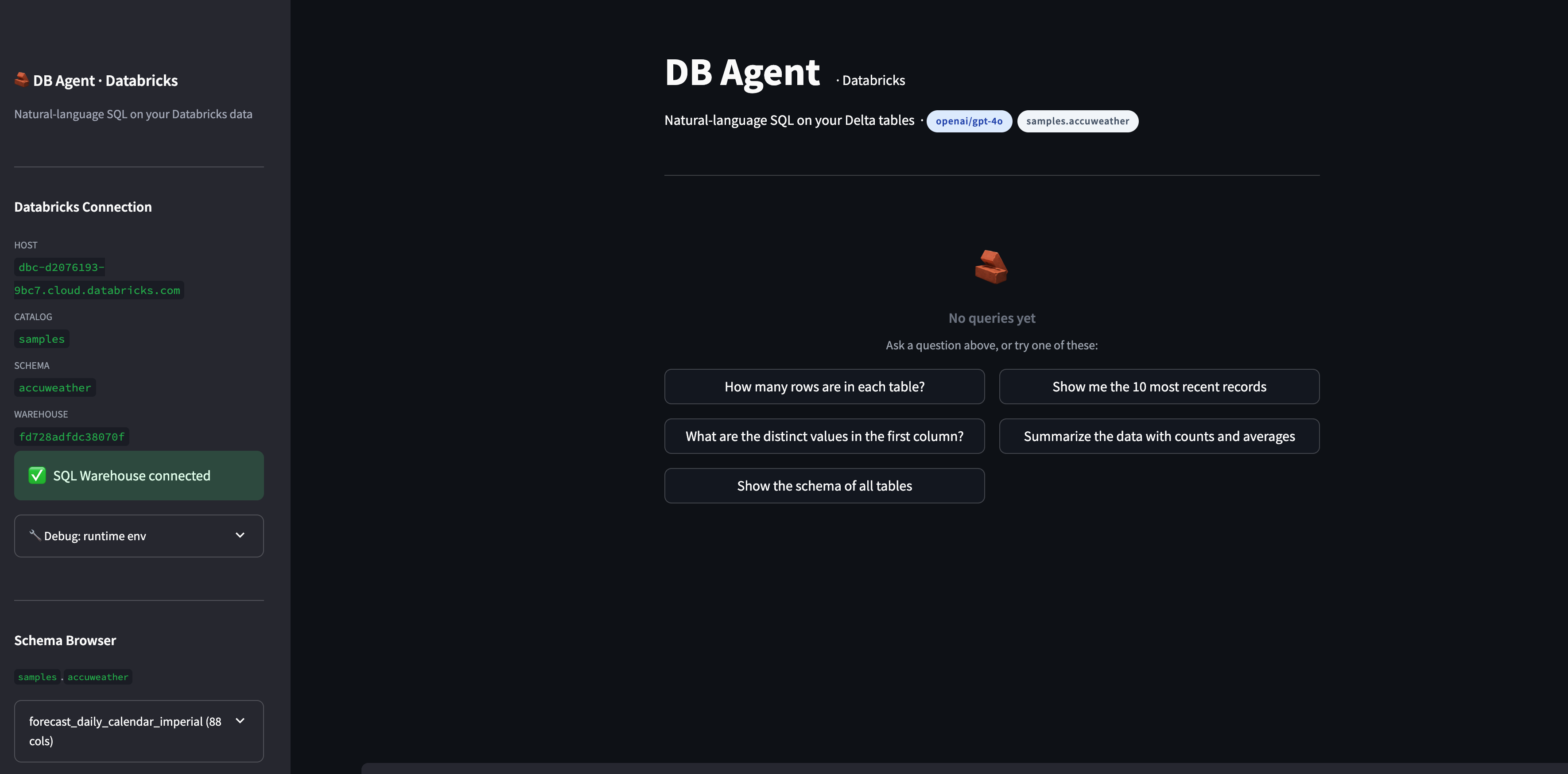
Lessons from teaching 10 people to build a text-to-SQL AI agent on Databricks in 2 hours — including the roadblocks. A guide for any team starting on Databricks.
This past Saturday I ran a 2-hour live bootcamp with 10 paid engineers and analysts. The goal: build and deploy a working text-to-SQL AI agent on Databricks, from scratch. We finished — but not before tripping over GitHub Models rate limits, Databricks Community Edition's fresh-runtime quirks, my own GitHub auth getting confused by multiple accounts, and the inevitable "wait, how is this different from Microsoft Fabric?" question.
This post is two things at once: a recap of what we built, and a field guide for any team about to start using Databricks. Most of the real value lives in the questions attendees asked and the roadblocks we hit live — not in the slides. So that's where we'll spend most of our time.
If you only have a minute: the agent itself is easy. The economics of Databricks, the safety layer, and where it fits alongside what you already own — that's the part that breaks teams.
Want to join the next live session? I run this bootcamp regularly — same hands-on format, same code we ship together. Register below.
A 30-second history of data platforms
Before we touch agents, you need a map. Here's the one I drew on the whiteboard during the session.
Pre-2010s: the relational behemoths. Oracle, Teradata, SQL Server. Fast SQL, expensive licenses, compute and storage tightly coupled. You paid for compute even when no one was querying. Larry Ellison spent years bashing AWS on stage — and then Amazon spent ten years quietly rewriting their own internal systems off Oracle and onto Aurora. That move alone tells you where the market was heading.
2000s–2010s: Hadoop and the big-data wave. Storage got cheap because S3 and HDFS let you dump anything — CSVs, JSON, logs, images — at near-zero cost. But to actually do anything with that data, you needed Java rockstars writing MapReduce jobs. Slow, brittle, and gatekept by a small priesthood of engineers.
2010s: Spark democratized big data. Apache Spark let Python developers process the same scale of data without writing a line of Java. Databricks was born from the team that built Spark.
Mid-2010s: cloud warehouses disrupted from the SQL side. Snowflake, BigQuery, Redshift. They separated storage from compute, billed by usage, and gave database admins a SaaS experience.
2020s: convergence on the Lakehouse. Databricks bolted ACID transactions onto S3 with Delta Lake. Snowflake added support for unstructured data and Iceberg tables. Today if you log into both side-by-side they look almost identical. They copy each other's features every quarter.
The key shift to internalize: storage and compute are now separate line items on your bill. Storage is essentially free (S3 is pennies per GB). You pay for compute only when you fire it. This is the single biggest reason teams move to Databricks.
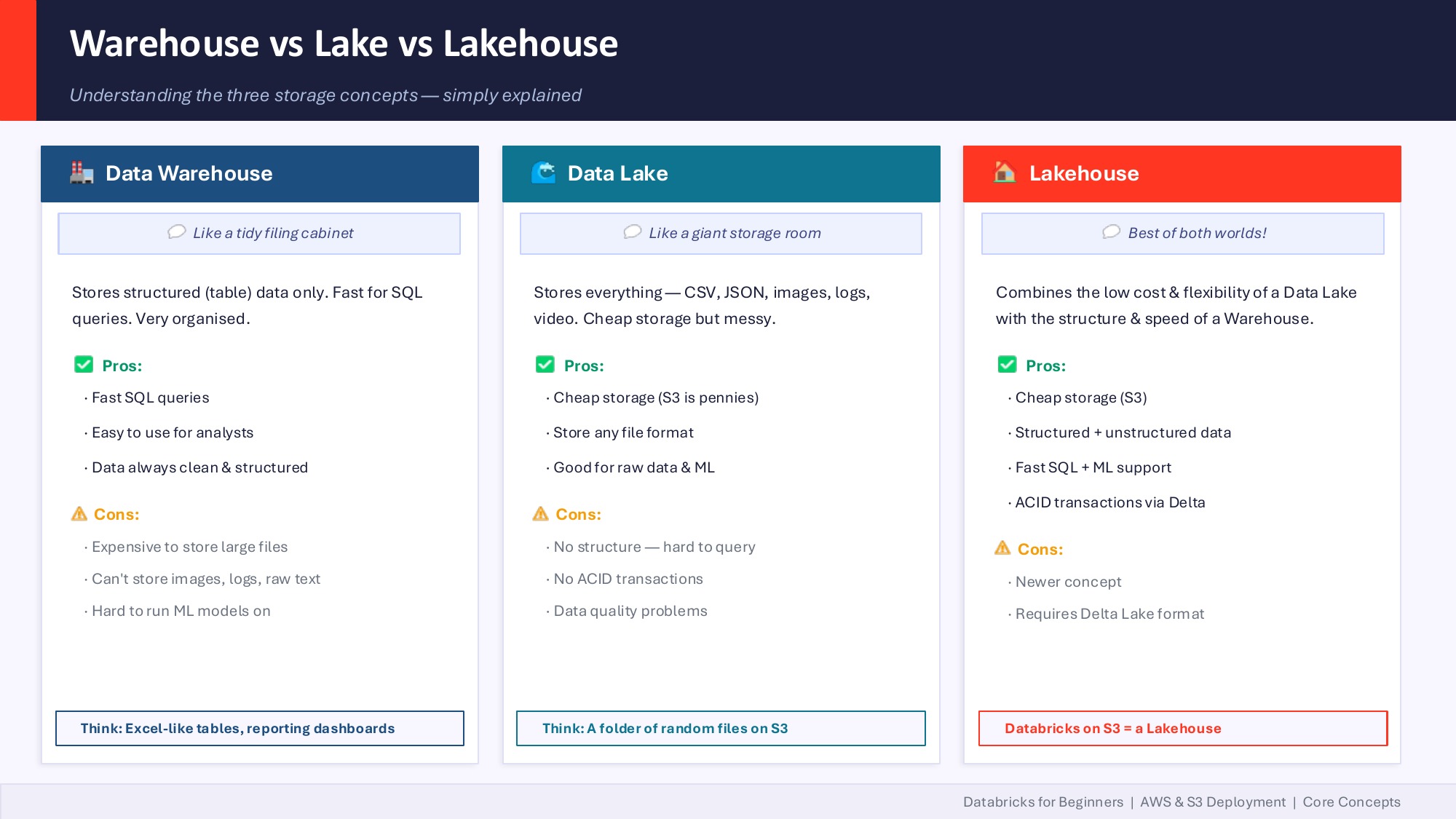
Why Lakehouse changed the economics
Old data warehouses were the equivalent of paying rent on a building 24/7 even when no one was inside. Lakehouse is renting the building only when you walk in.
In practice on Databricks:
- Your data lives in S3 as Parquet or Delta files. S3 storage at enterprise scale is rounding-error pricing.
- Databricks compute spins up when you run a job and shuts down when you're done. You're billed in DBUs (Databricks Units) — think of them like AWS EC2 hours but for data work.
- Unity Catalog sits over the top, governing who can access what, with lineage and audit logs. It's also where you set per-team budget caps so a runaway notebook doesn't surprise you on the monthly invoice.
A pattern I'm starting to see in US enterprises: CTOs allocating token budgets per team — the same way they used to allocate cloud spend. With AI agents in the mix, this is becoming non-negotiable. An agent in a tight loop can burn through compute and LLM tokens faster than any human user.
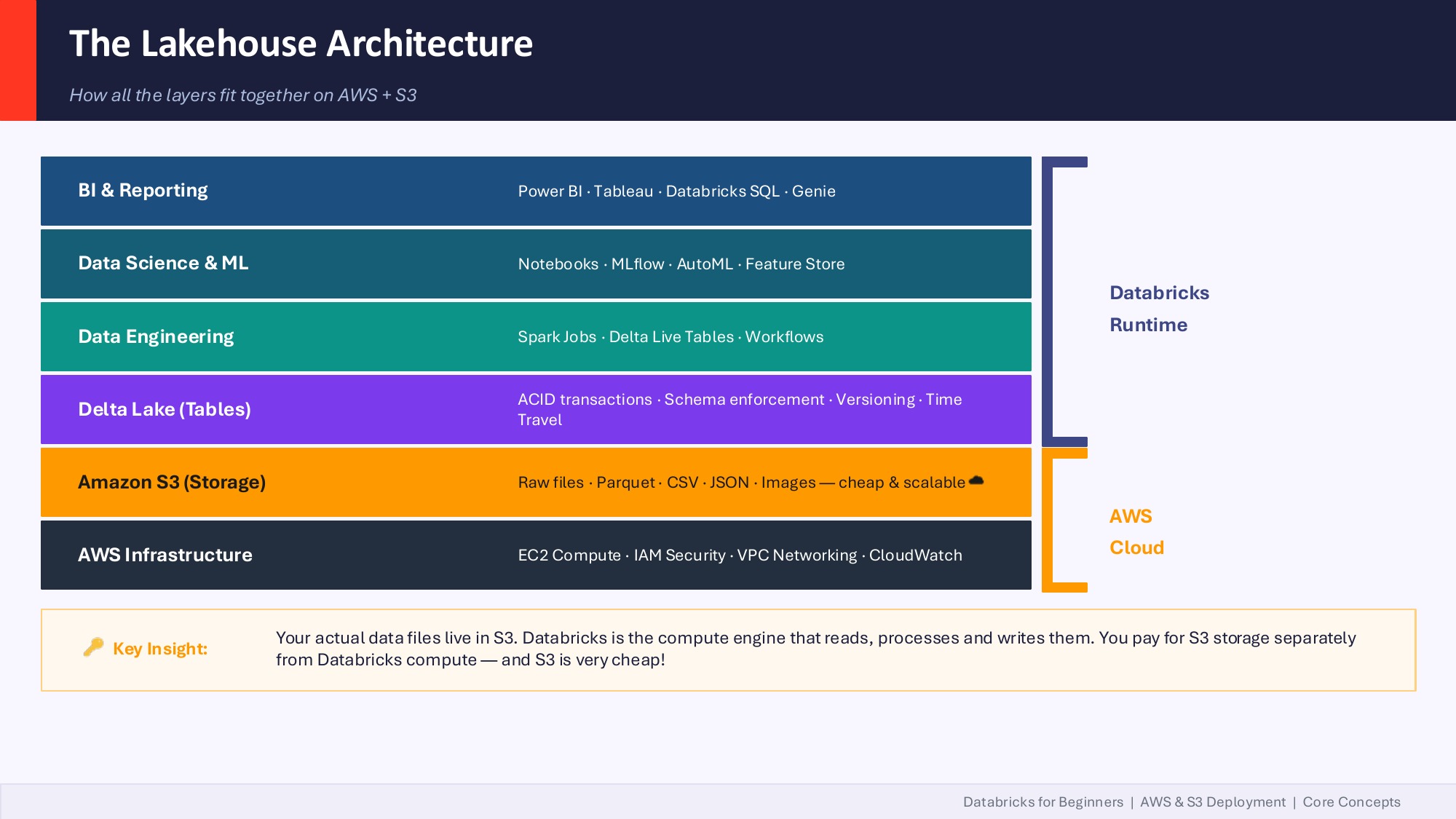
The mental model: Databricks is the compute engine that reads, processes and writes files that live in your own S3 bucket. You pay for those two things separately, and that's where the savings come from compared to a traditional warehouse where compute and storage were inseparable.
Where Databricks fits in your existing stack (M365 / Azure / Fabric / Snowflake)
This was the most-asked question of the session, and it deserves the most space.
"We have Azure SQL Database, we have Power BI, and we have Microsoft Fabric. So how is Databricks going to fit in?"
The answer: Databricks does not replace any of that. It augments.
There are effectively two islands inside the Microsoft world:
- Microsoft 365 island — Word, Excel, Teams, Outlook, SharePoint, Power BI, Power Apps, Microsoft Fabric.
- Azure cloud island — Azure SQL, Synapse, ADLS Gen2, AKS, Functions.
Most enterprises have data scattered across both, plus Salesforce, plus a few legacy SQL Servers. Databricks sits between those islands as a unified compute and governance plane. You ingest from Azure SQL, from Microsoft Graph (M365 data), from Salesforce, from S3 — bring it together in Delta tables, govern it with Unity Catalog, and serve it back to Power BI or Fabric or your custom apps.
If you're a Microsoft Fabric shop already, Databricks isn't a rip-and-replace decision. It's a "where does each tool earn its keep" decision. Fabric is great for self-serve BI inside the M365 universe. Databricks is stronger for production data engineering at scale, advanced ML, and increasingly, AI agents that need governed access to your full data estate.
Snowflake vs Databricks: how to actually choose
This came up too. The honest framing:
- Snowflake evolved from the database side. If your team is mostly database admins and SQL analysts pooling structured data into a warehouse, Snowflake's ergonomics are hard to beat.
- Databricks evolved from Spark + the Hadoop ecosystem. If your team is heavy on data engineers, ETL developers, and ML practitioners working with mixed structured and unstructured data, Databricks fits more naturally.
Large enterprises (think Workday-scale) often run both: Databricks for transformation and Iceberg tables on S3, Snowflake for downstream SQL analytics. They're not mutually exclusive.
The cost lever in both cases is the same: shift to consumption-based billing, store data cheap on object storage, fire compute on demand.
AI agents on Databricks: three paths
Now to the part everyone signed up for. But first, a clarification we kept coming back to during the session:
"The word 'agent' has been overly used. There is no single definition."
Microsoft Copilot calls things "agents" — they're really skill files. Anthropic defines an agent as an LLM that dynamically directs its own process and tool usage. Databricks ships an "Agent Bricks" product that's a managed, low-code agent builder. They're all called agents and they're all different things.
Here are the three real paths to building an AI agent on Databricks:
1. Low-code / no-code (Agent Bricks). You declare a task — "extract the line items from these invoices" or "answer policy questions for our field technicians" — and Databricks auto-generates synthetic training data, evaluation harnesses, LLM judges, and an optimized agent. Zero code. Best when the task fits Databricks' declarative model and you have the budget. Note: Agent Bricks requires Mosaic AIML enabled, which is a paid feature on top of the standard Databricks license.
2. Code-first SDKs. You build the agent yourself using a framework like the Claude Agent SDK or Strands Agents SDK from AWS. More flexibility, more responsibility. Requires rigorous testing and validation before you ship anything to production.
3. Custom code, deployed via Databricks Apps. This is what we built in the bootcamp. You write your own pipeline — prompts, tools, validators, agent loop — in Python, then deploy it as a Databricks App. The data never leaves your workspace. You control every line.
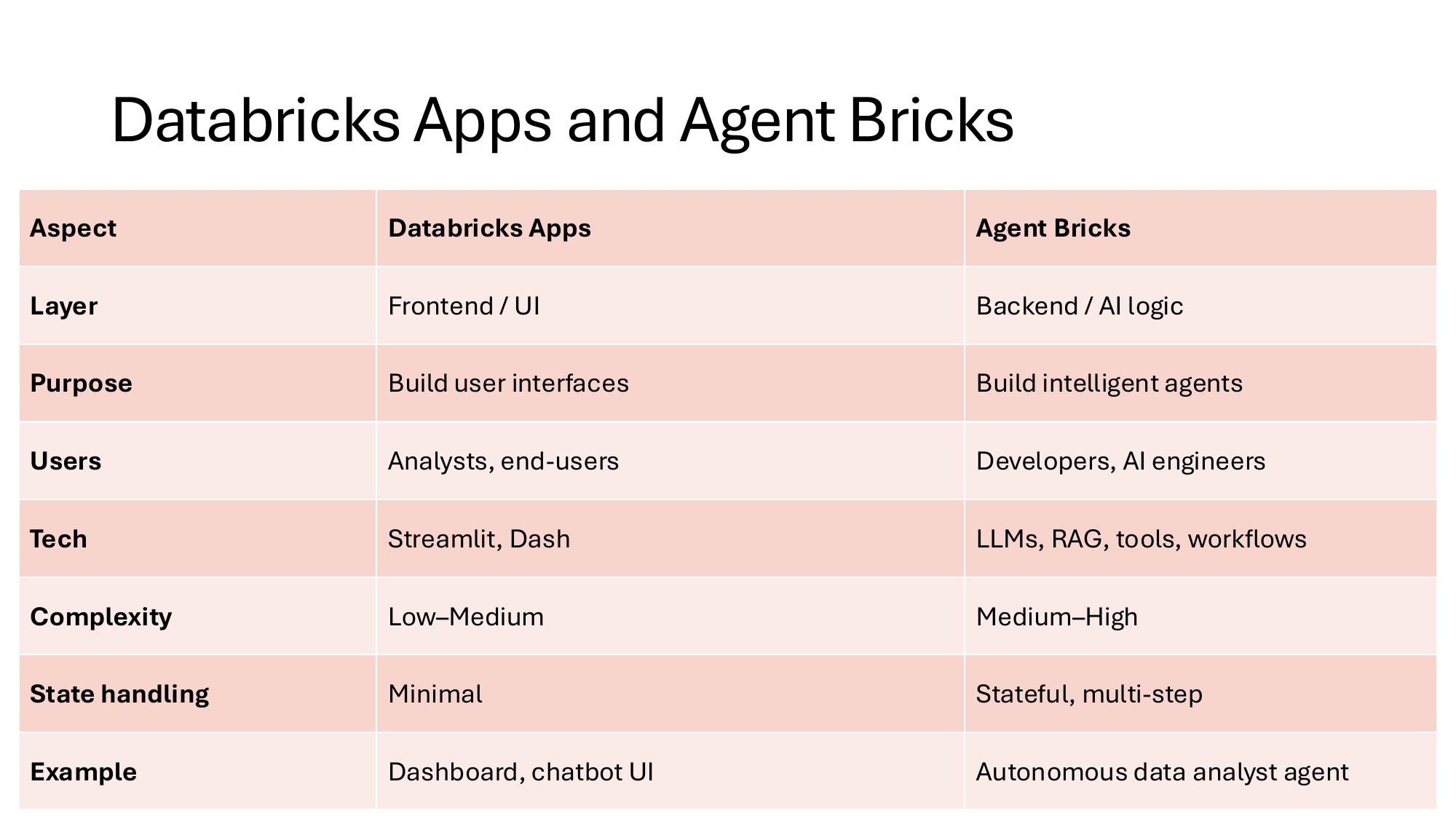
The simple way to remember it: Apps host the UI you write. Agent Bricks builds the AI agent for you. They sit at different layers of the stack and many teams will eventually use both.
What we built in 2 hours: DB-Agent
DB-Agent is an open-source text-to-SQL agent. A user asks a question in plain English. The agent retrieves relevant schema, asks an LLM to generate a SQL query, validates it against a SELECT-only safety layer, runs it against the target database, and returns results with every intermediate step visible.
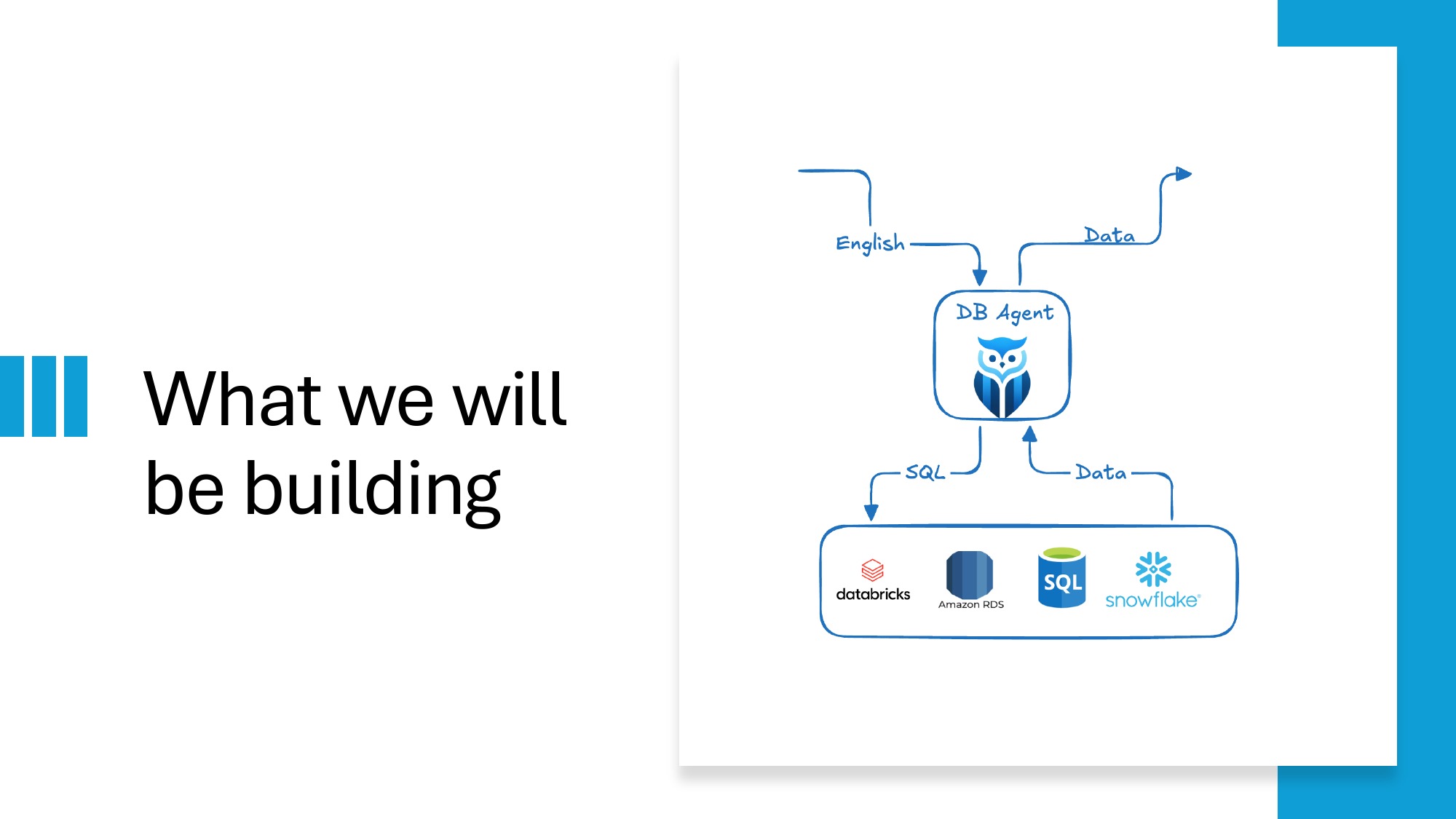
The repo ships three deployment variants:
- Streamlit — quickest to run locally
- Next.js + FastAPI — full-stack, deploys to AWS Lambda
- Native Databricks App — Unity Catalog integration, OAuth service principal
Repo: github.com/db-agent/db-agent
The orchestration is intentionally a single linear function so anyone can trace it end to end:
"""
pipeline.py — The core orchestration logic. Start reading here.

Data flow (one question → one PipelineOutput):

    question
      │
      ▼
    build_user_prompt()      ← prompts.py  (schema + question → prompt)
      │
      ▼
    call_llm()               ← llm.py      (prompt → raw LLM text)
      │
      ▼
    parse_sql_response()     ← llm.py      (raw text → SQLResponse)
      │
      ▼
    validate_sql()           ← sql_safety.py  (SQL → ValidationResult)
      │
      ▼  (only if is_safe)
    run_query()              ← db.py       (SQL → rows)
      │
      ▼
    PipelineOutput           ← models.py
"""
Notice the conditional (only if is_safe) step. That's the part most text-to-SQL tutorials skip — and it's the part that matters most in production.
The validator itself is small enough to read in one breath:
# Keywords that must never appear in a safe read-only query.
_FORBIDDEN = {
    "DROP", "DELETE", "UPDATE", "INSERT", "ALTER",
    "TRUNCATE", "CREATE", "REPLACE", "MERGE", "EXEC",
    "EXECUTE", "GRANT", "REVOKE", "ATTACH", "DETACH",
}

def validate_sql(sql: str) -> ValidationResult:
    stripped = sql.strip()
    if not stripped:
        return ValidationResult(is_safe=False, reason="SQL is empty.")
    # ... single-statement check, SELECT-only check, forbidden-keyword check
It's not glamorous code. But last month a developer made the news for deleting a production database when their AI assistant generated and executed a DROP TABLE. A model that can write DROP TABLE doesn't get a second chance. The validator runs before the SQL ever reaches the database driver.
The roadblocks we hit (so your team doesn't have to)
Live workshops surface the real friction points. Here are the ones we hit, with mitigations.
1. GitHub Models free tier on personal accounts
The plan was to use GitHub Models' free tier as the LLM endpoint — no credit card needed, generous-enough quota for a 2-hour session. In practice, several attendees couldn't even enable the free tier on their personal GitHub accounts. The "activate" option just wasn't appearing for them.
Workaround during the session: I shared my own GitHub Models token. That worked for about ten minutes before everyone running on the same token started to share the same rate limit, and we hit API connection error responses.
Lessons for any team running similar workshops:
- Pre-provision a shared paid OpenAI key for live workshops. The cost is rounding error and the friction reduction is enormous.
- Have Ollama as the offline fallback. It runs locally, it's free, and it never rate-limits.
- The free model (GPT-4 mini variants) has a 4K-token context window. Fine for toy demos, fragile for anything realistic.
2. Multiple GitHub accounts breaking auth
I have multiple GitHub accounts on my laptop. Databricks's GitHub integration silently picked the wrong one and threw a confusing auth error. Took five minutes to debug live.
Lesson: before any Databricks + GitHub integration work, run gh auth status and confirm which account is active. If you switch accounts often, set up gh auth switch aliases.
3. Databricks Community Edition's fresh-runtime gotcha
Community Edition is great for learning. But the runtime is fresh on every restart. There are no pre-installed libraries persisted across sessions. Run pip install first, every single time, or your imports fail.
Lesson: for any real work, the paid tier lets you set up cluster-scoped libraries and init scripts. Community Edition is for prototyping only.
4. db_utils only exists inside Databricks notebooks
Some attendees tried to run the Databricks code locally. db_utils (Databricks's native utility module) doesn't exist outside the workspace — your imports break.
Lesson: if you want a code path that runs both locally and on Databricks, abstract the workspace-only modules behind a config check. The DB-Agent repo does this — the streamlit_app/ variant runs anywhere; the databricks_app/ variant assumes the workspace is present.
5. The 2-hour clock
We had to skip the MCP server demo and the Agent Bricks GUI walkthrough due to network bandwidth issues mid-session. Lesson learned for next time: record those segments separately as bonus material so the live session can flex.
How Databricks unifies agent governance
The single biggest reason enterprises pick Databricks for production AI agents isn't the LLM tooling — it's that the same governance plane covers data, models, and agents. The AI Gateway routes calls across Databricks-hosted models, MCP servers, and external models like OpenAI or Anthropic. Unity Catalog handles the data-side access control and lineage. One audit log, one access model, one set of budget caps.
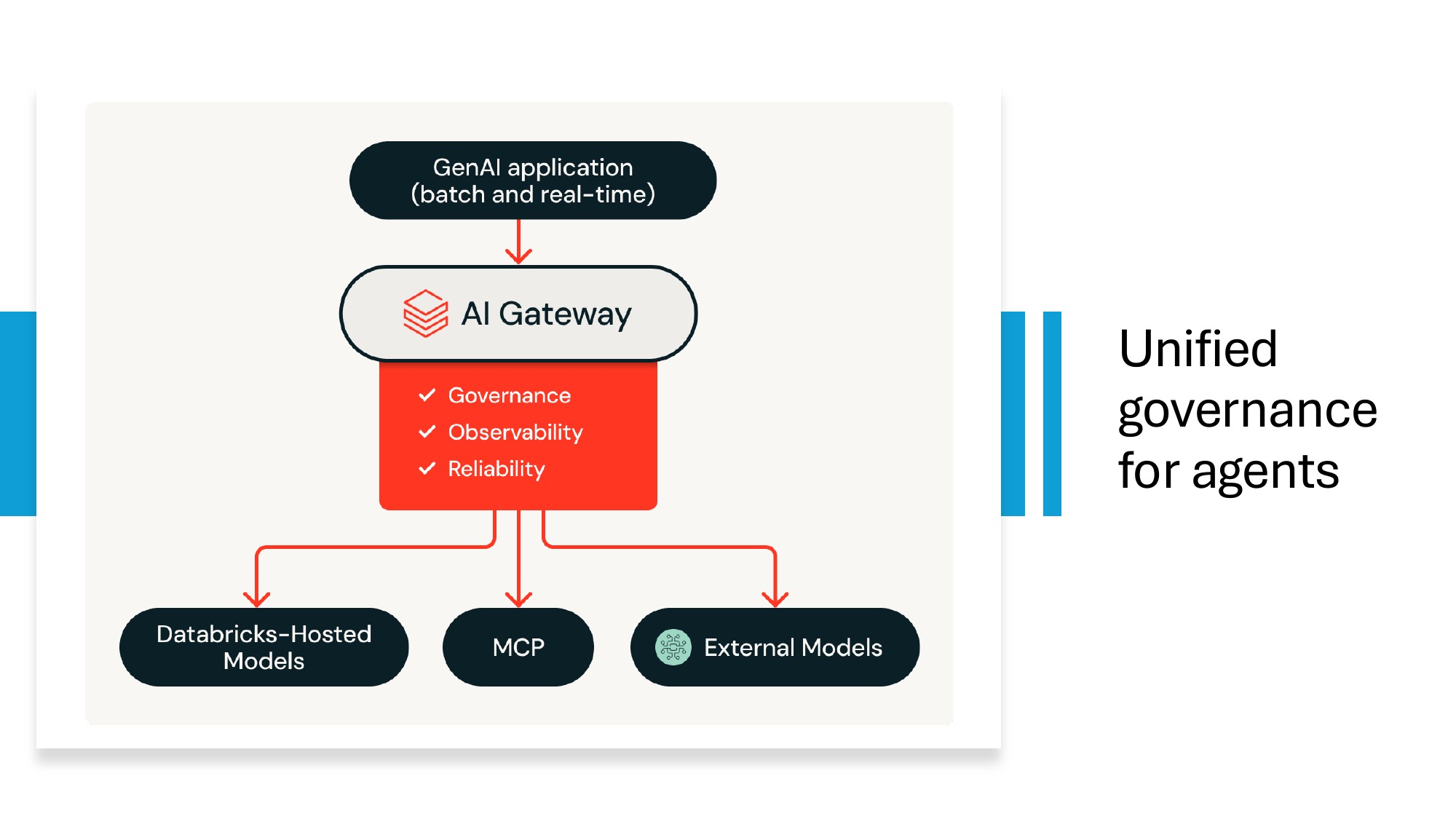
This is what makes the production-database-deletion risk tractable. A developer recently made the news for losing a production database when their AI assistant generated and ran a DROP TABLE. SELECT-only validators are not optional — and on Databricks, those validators sit inside the same governance fabric as your data permissions, so an agent that loses its mind cannot escape the access policies you already wrote.
For the specific questions teams ask before onboarding to Databricks — pricing, migration, Snowflake comparison, governance — see the FAQ at the bottom of this post.
What I'd tell any team on Day 1 of Databricks
The guiding principles, opinionated:
- Get Unity Catalog right early. Retrofit is painful. Set up your catalog hierarchy, naming conventions, and access groups before anyone writes their first table.
- Pick one use case and ship it. Don't try to migrate the whole estate. Find one workload, get it production-ready, learn what hurt, then expand.
- Plan token and DBU budgets per team from Day 1. DBUs work like AWS billing alerts. Set them. With AI agents in the picture, this is no longer optional.
- Don't conflate compute and storage billing. They're separate. Optimize them separately.
- Choose Delta Lake from the start. Genie, AI/BI, and Agent Bricks all assume Delta. Going with raw Parquet now means a migration later.
- Keep AI agent code in version control, separate from your data layer. Agents change weekly; data schemas don't. Treat them as different release cadences.
- Do not give an agent write access to production until you have: a guardrail layer that blocks dangerous operations, per-team budget caps, audit logs of every action, and a human-in-the-loop for any operation above a threshold.
- Use Databricks Apps for internal tools. Reach for Agent Bricks only when the use case actually fits its declarative model — and check your license tier first.
Resources & next steps
- DB-Agent open-source repo — github.com/db-agent/db-agent
- Anthropic — Building Effective Agents — anthropic.com/research/building-effective-agents
- Anthropic Academy (free MCP and agent courses) — anthropic.skilljar.com
- MCP Quickstart — modelcontextprotocol.io/quickstart
- Databricks Apps overview — docs.databricks.com/aws/en/dev-tools/databricks-apps
- Databricks State of AI Agents 2026 — databricks.com/resources/ebook/state-of-ai-agents
If you want to go deeper on the data side — Medallion Architecture, Delta Lake, Unity Catalog, Lakeflow, AI/BI Genie — the next bootcamp is the Databricks Lakehouse Bootcamp on May 9–10. Same pattern: hands-on, bring your laptop, leave with a deployed pipeline.
The agent is the easy part. The data foundation underneath it — and knowing where it sits in the stack you already own — is what separates a demo from a production system. That's the part worth investing in.
Join the next live bootcamp
Same hands-on format. You leave with a working text-to-SQL agent, deployed on Databricks, and a clear mental model of where AI agents fit in your data stack.
Frequently asked questions
Do we have to migrate everything to Databricks to start using it?
No. Pick one use case, ship it, then expand. Databricks connects to your existing Azure SQL, Snowflake, Salesforce, S3, and Microsoft Graph. You can start with one team's analytics workload and leave the rest of your estate untouched.
How does Databricks pricing actually work?
Two separate line items. Storage on S3 (or ADLS) is essentially free at any reasonable scale. Compute is metered in DBUs (Databricks Units) and billed only when running. Set per-team budget caps in Unity Catalog before giving anyone production access. With AI agents in the mix, also set per-team token budgets — agents in a loop can burn money fast.
Do we need Agent Bricks or can we build AI agents ourselves on Databricks?
Either, depending on team capability and license tier. Agent Bricks requires Mosaic AIML (paid). It's the right call when the task fits its declarative model and you don't want to write code. Custom-built agents (like the open-source DB-Agent) give you full control and are deployable anywhere — at the cost of having to write and maintain them yourself.
How does Databricks govern AI agents?
Through the AI Gateway plus Unity Catalog. The AI Gateway gives you observability, governance, and reliability across Databricks-hosted models, MCP servers, and external models like OpenAI or Anthropic. Unity Catalog handles data-side access control and lineage.
Does Databricks replace Microsoft Fabric, Azure SQL, or Power BI?
No — Databricks does not replace those tools, it augments them. Most enterprises run data across Microsoft 365 (Fabric, Power BI) and Azure (Azure SQL, Synapse). Databricks sits between those islands as a unified compute and governance plane: it ingests from Azure SQL, Microsoft Graph, S3, and other sources, then serves results back to Power BI, Fabric, or custom apps.
How should we choose between Snowflake and Databricks?
If your team is mostly database admins and SQL analysts pooling structured data into a warehouse, Snowflake's ergonomics are hard to beat. If your team is heavy on data engineers, ETL developers, and ML practitioners working with mixed structured and unstructured data, Databricks fits more naturally. Many large enterprises run both — Databricks for transformation, Snowflake for downstream SQL analytics.
What's the production-database-deletion risk with text-to-SQL agents?
It is real and recent — a developer made the news after their AI assistant generated and ran a DROP TABLE on production. Every text-to-SQL agent in production needs a SELECT-only validator between 'model emits SQL' and 'SQL hits the database.' It is the cheapest insurance you will ever buy.