RunPod vs Lambda vs Nebius vs Shadeform: H100 Review 2026
A hands-on developer review of four neoclouds, RunPod, Nebius, Shadeform and Lambda: sign-up, containers vs VMs, real prices (tested on an H100) and MIG.
There are now dozens of neoclouds (GPU-first cloud providers) to pick from, and their websites don't tell you much about what it is actually like to use them. I signed up for four popular ones, RunPod, Nebius, Shadeform and Lambda, and reviewed them the way a developer would use them: sign-up, launch flow, what you get, and what it costs. This is a product review, not a GPU benchmark. To keep the comparison fair I launched the same GPU, an H100, on each, but the lessons apply to any GPU you rent.
This post covers:
- The two kinds of GPU product these clouds sell: containers and VMs
- Signing up and launching a GPU on each one (I used an H100)
- What the hourly GPU price actually includes
- Why container vs VM vs bare metal matters, with a live MIG (Multi-Instance GPU) test
- Which product fits which kind of work
- How to launch GPU instances on any of these clouds with one command, using the free, open-source tool labagent
Watch on YouTube if the video does not load.
Disclosure: I paid for every cloud in this review myself, and nothing here is sponsored.
Prices below are what I saw in November 2026. GPU prices and availability change by the hour, so check before you commit. I track them nightly across neoclouds on the free GPU Price tracker, which compares H100, H200, B200 and A100 prices per hour. For what that data shows, read The Cheapest H100 Is Out of Stock: What 25 Clouds of GPU Pricing Data Shows.
The short answer: which neocloud is best for what?
On price, using an H100 as the yardstick, the GPU marketplace (Shadeform) was cheapest at $2.73/hr for a single H100, against $4.39 to $4.51/hr on RunPod and Nebius and $3.79/hr for an H100 PCIe on Lambda. The cheapest option was also a bare-metal machine, which is the only kind that let me split the GPU into seven slices. Details, screenshots and caveats are below.
| RunPod | Nebius | Shadeform | Lambda | |
|---|---|---|---|---|
| Product type | Container (Pods) | Container (DevLabs) and VMs | VM marketplace | VMs |
| 1x H100 price I saw (Nov 2026) | $4.39/hr (H100 80GB HBM3) | $4.51/hr | $2.73/hr (cheapest available) | $3.79/hr (H100 PCIe) |
| Billing | Per millisecond | Per second | Per hour, auto-expiry | Per hour |
| JupyterLab ready | Yes | Yes (DevLabs) | No, you install it | Not tested |
| Can enable MIG | No (container) | Not tested | Yes (bare metal) | Not tested |
| Top-up required | Yes | Yes | Yes | Yes |
Prices move daily. For the current numbers across all neoclouds, see the GPU Price tracker.
Two kinds of GPU product: dev containers and virtual machines
Each of these neoclouds sells a lot of products, but for a developer, two of them stand out.
1. Dev containers. A Docker container with an app already set up, such as JupyterLab, that you can spin up in a minute or two. They are the easiest way to get started. Many run in a serverless style: you pay while the container runs, and when you shut it down the compute billing stops. Check whether attached storage keeps billing.
- RunPod calls these Pods
- Nebius calls them Serverless AI DevLabs
2. Virtual machines. A traditional VM with the GPU passed through to it via KVM. Pricing works like any traditional cloud: you pay per hour while it runs, and storage is often extra.
- Shadeform (a marketplace of VMs from many providers)
- Lambda (GPU instances)
- Nebius (VMs inside a full cloud)
RunPod: fastest path to a GPU notebook
Sign-up: GitHub or Google login. You have to top up your account before you can launch anything. I added $50. The days of free starter credit are gone.
Launching an H100 Pod:
- Click Pods in the left sidebar. You will also see Serverless and Clusters.
- Scroll the list of available GPUs and pick H100. The PCIe variant is a little cheaper. For a single-GPU job, PCIe vs SXM doesn't matter much.
- Choose 1 GPU and click Deploy Pod.
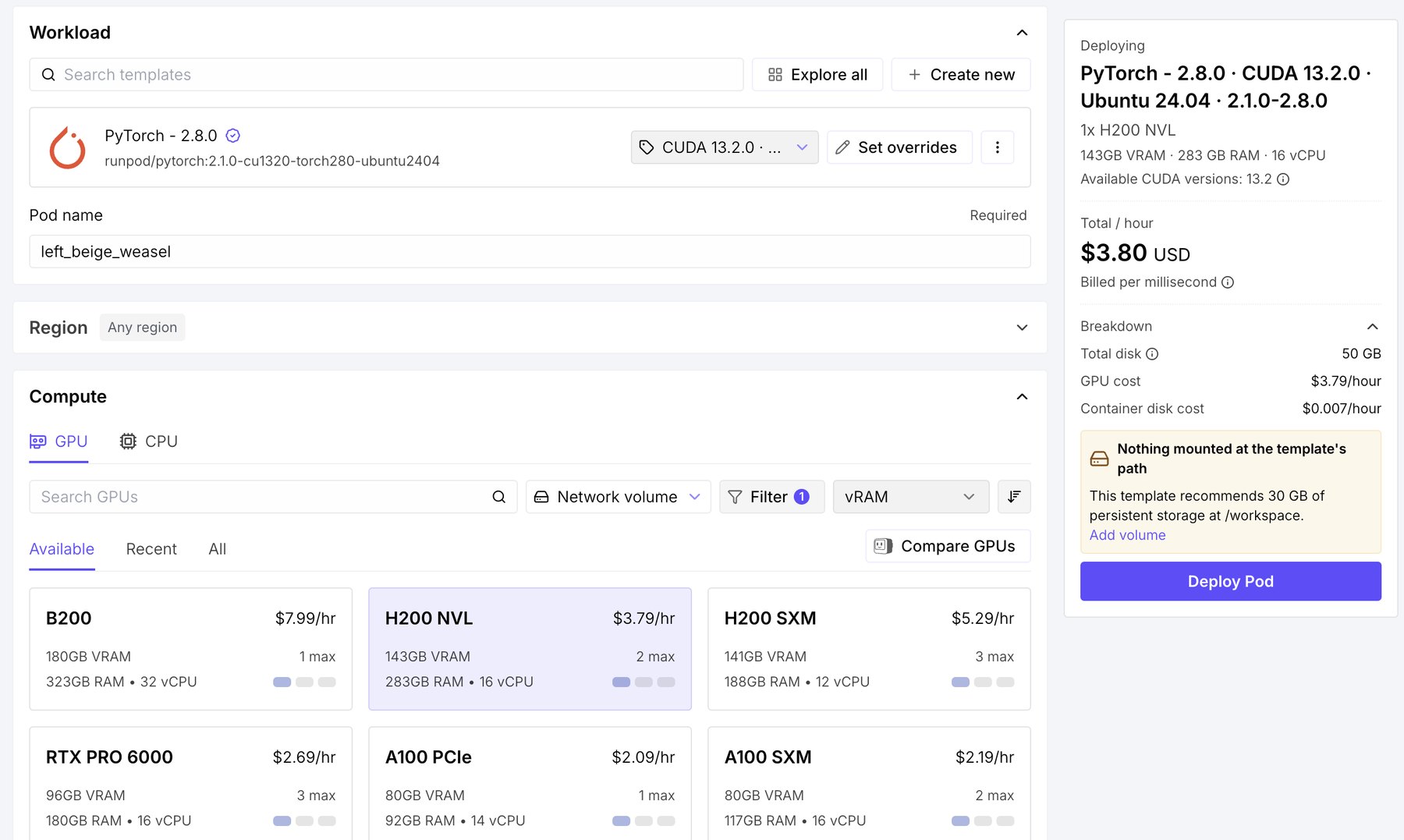
Price I saw: about $4.39 to $4.40/hour for one H100 80GB on RunPod's secure cloud. The deploy screen shows the total per hour on the right and tells you it is billed per millisecond. (The screenshot below has an H200 NVL selected at $3.79/hr. It is the same flow for an H100.)
Within a few minutes the Pod was up. RunPod gives you SSH connection details and a direct JupyterLab link. Open a terminal and check what you got:
nvidia-smiNebius: a full cloud, not just GPU rental
Sign-up: GitHub login, plus a credit top-up before you can launch.
The biggest difference from RunPod is that Nebius is a full-fledged cloud. Besides GPU VMs and GPU clusters, you get managed Kubernetes and databases, which most neoclouds don't offer. Most neoclouds focus on GPU rental. Nebius looks more like a GPU-first AWS.
Launching a dev container (Serverless AI, DevLabs):
- Open Serverless AI, then Devlabs. It is marked as new.
- Pick a template. JupyterLab is for writing code and fine-tuning. vLLM or Ollama are for quick inference.
- Select H100 as the GPU.
- Pick a region. The default was EU North. US North had no H100 available when I checked, so I went back to EU North.
- Optionally add your SSH key, then deploy with one click.
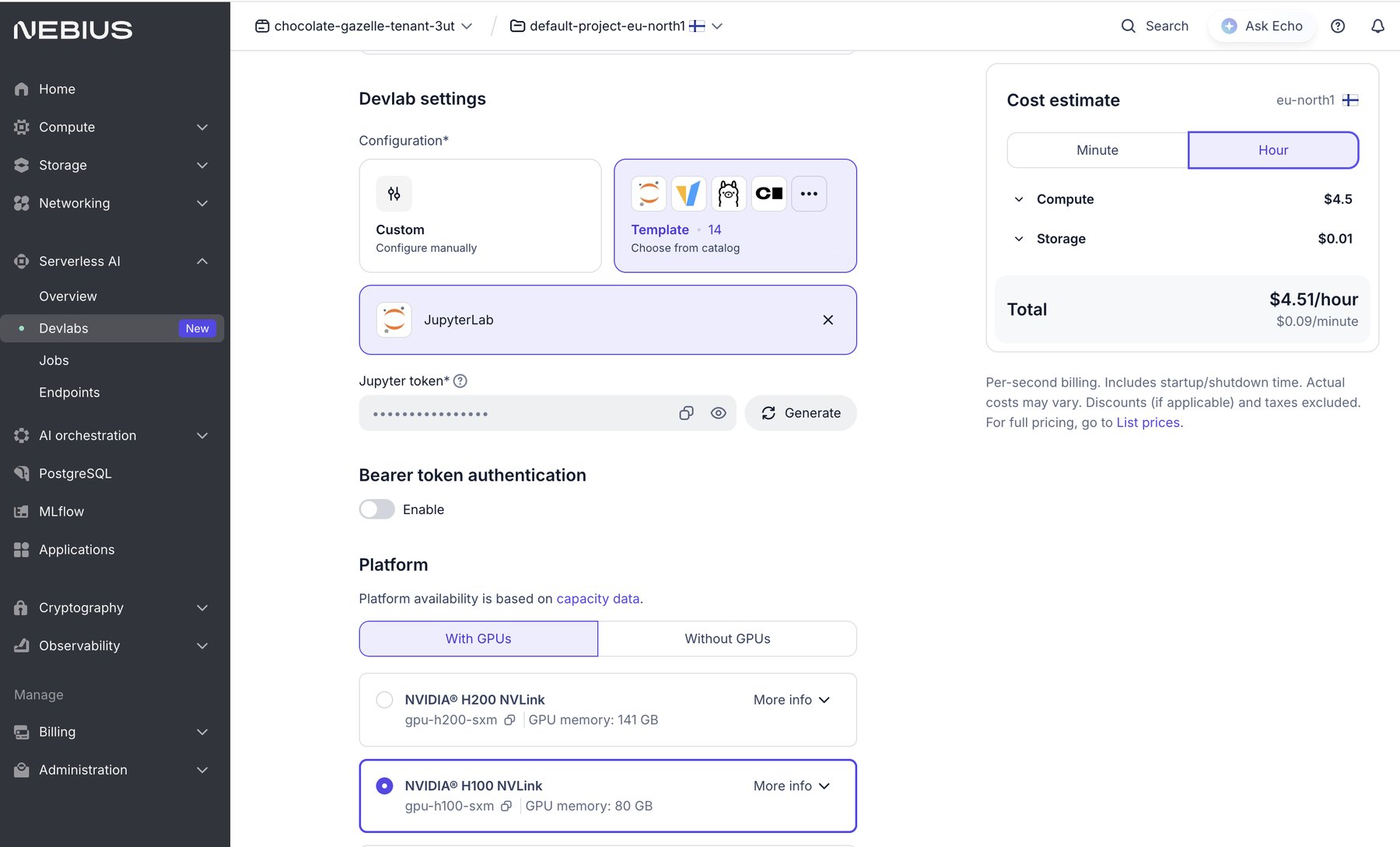
Price I saw: $4.51/hour for an H100 in EU North ($4.50 compute plus $0.01 storage), close to RunPod. Billing is per second and includes startup and shutdown time.
Tip: if a GPU isn't available, try another region before you give up. Availability on neoclouds changes by the hour.
Shadeform: a GPU marketplace with cheaper H100s
Sign-up: GitHub login, plus a top-up on first use.
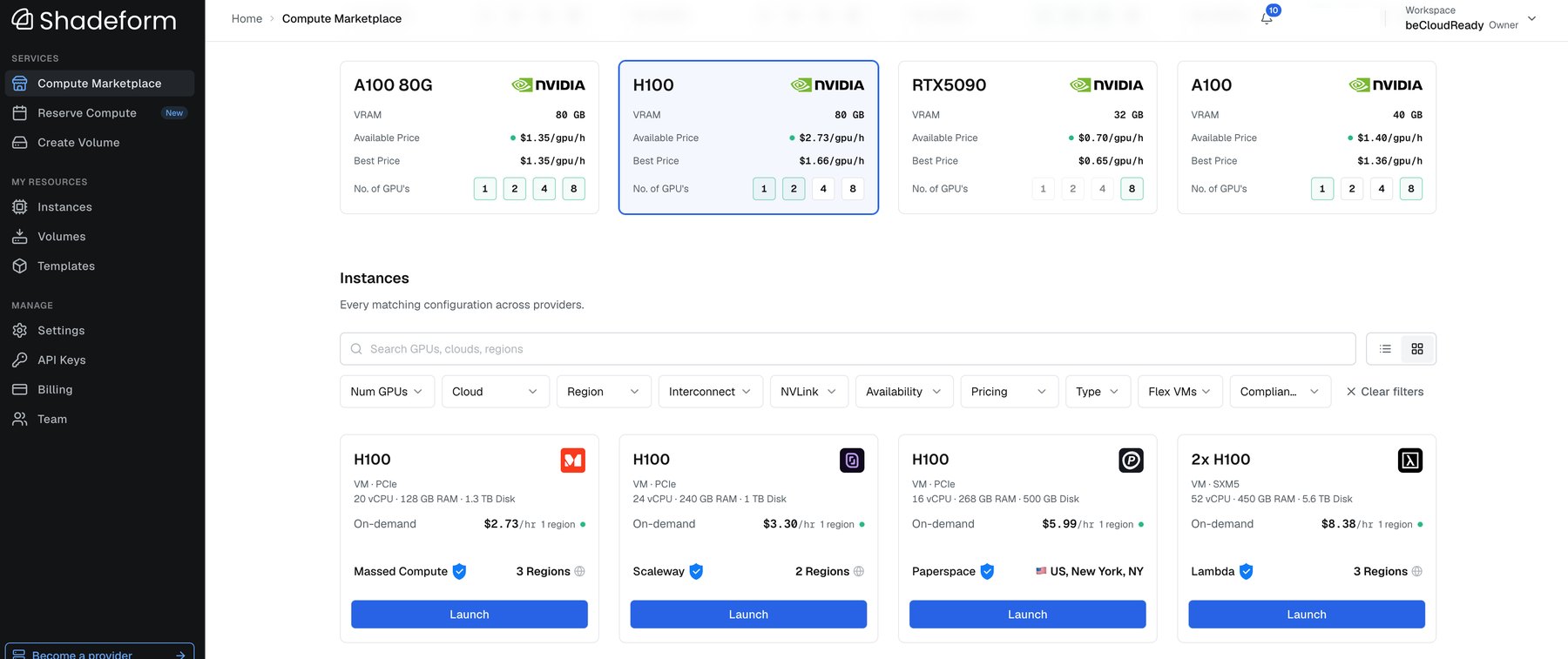
Shadeform isn't a cloud provider itself. It is a marketplace. Neocloud providers list their spare inventory on it, and you rent from them through one console. The benefit is variety and price: on RunPod and Nebius I was paying $4.39 to $4.51 an hour for an H100, while on Shadeform the cheapest available H100 was $2.73/hr, with others at $3.30 (Scaleway) and $5.99 (Paperspace). The card at the top even advertises a "best price" of $1.66/hr, but that one wasn't available when I looked, so compare the available price.
Launching an H100:
- Click H100 to see every H100 offer across providers.
- Pick one. I went with the cheapest, from Massed Compute, in North America.
- Click Launch.
What you get is a VM. In my case it turned out to be bare metal, more on that below. Either way, it takes longer to boot than a container: a few minutes instead of under a minute.
Shadeform gives you a bare machine, so there is no JupyterLab by default. To get one, SSH in and run:
python3 -m venv ~/ft && source ~/ft/bin/activate
pip install jupyterlab
jupyter lab --no-browser --ip=127.0.0.1 --port=8888
Then tunnel it to your laptop instead of opening a public port:
ssh -N -L 8888:localhost:8888 <user>@<instance-ip>
# open http://localhost:8888 and paste the token
Lambda: simple GPU instances
Sign-up: account plus top-up, like the others.
Lambda is a pure-play neocloud: a short list of services, aimed at GPU workloads from single instances up to large clusters. The UI is straightforward.
Launching an H100 instance:
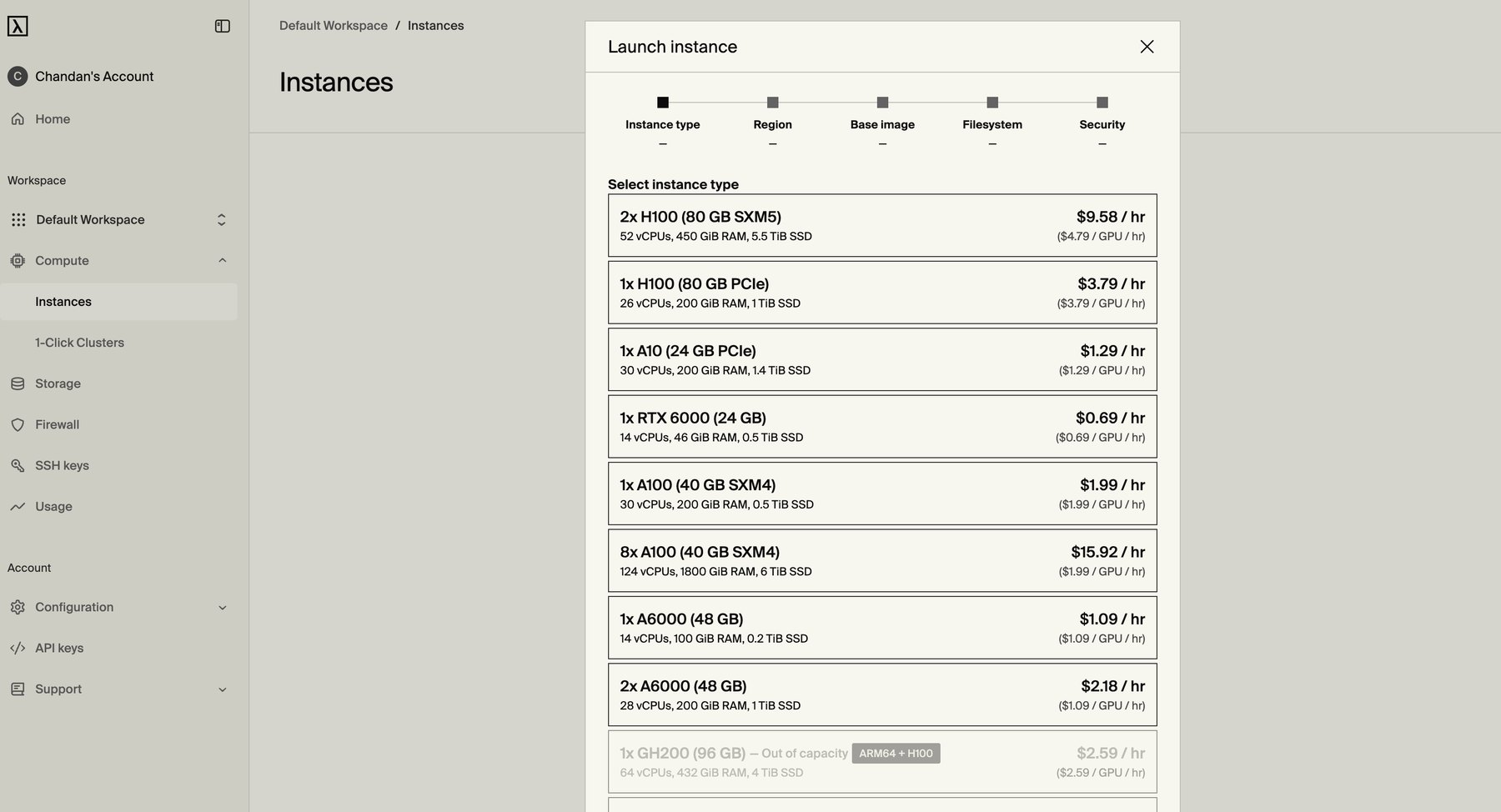
- Click Instances, then Launch instance. You immediately see every GPU type they have, with the per-GPU price.
- Pick H100. A single H100 PCIe was $3.79/hr, and a 2x H100 SXM5 was $9.58/hr ($4.79 per GPU). Mine was in Utah. Some types, like the GH200, showed "out of capacity".
- Choose the Lambda Stack 24 image, Ubuntu 24.04 with CUDA drivers preinstalled.
- Decide whether to attach a filesystem. If you don't, all your data is lost when you delete the instance. Attach storage if you need to keep anything.
- Select your SSH key, name the instance and launch.
Container vs VM vs bare metal: why it matters for GPU work
For most developers, a container and a VM feel the same: you get a terminal, Python and a GPU. The difference shows up when you need to configure the GPU itself.
How to check whether you are in a container, a VM or on bare metal
Run this on any GPU instance:
if [ -f /.dockerenv ]; then echo "container"
else echo "virtualization: $(systemd-detect-virt)"   # 'none' means bare metal
fi
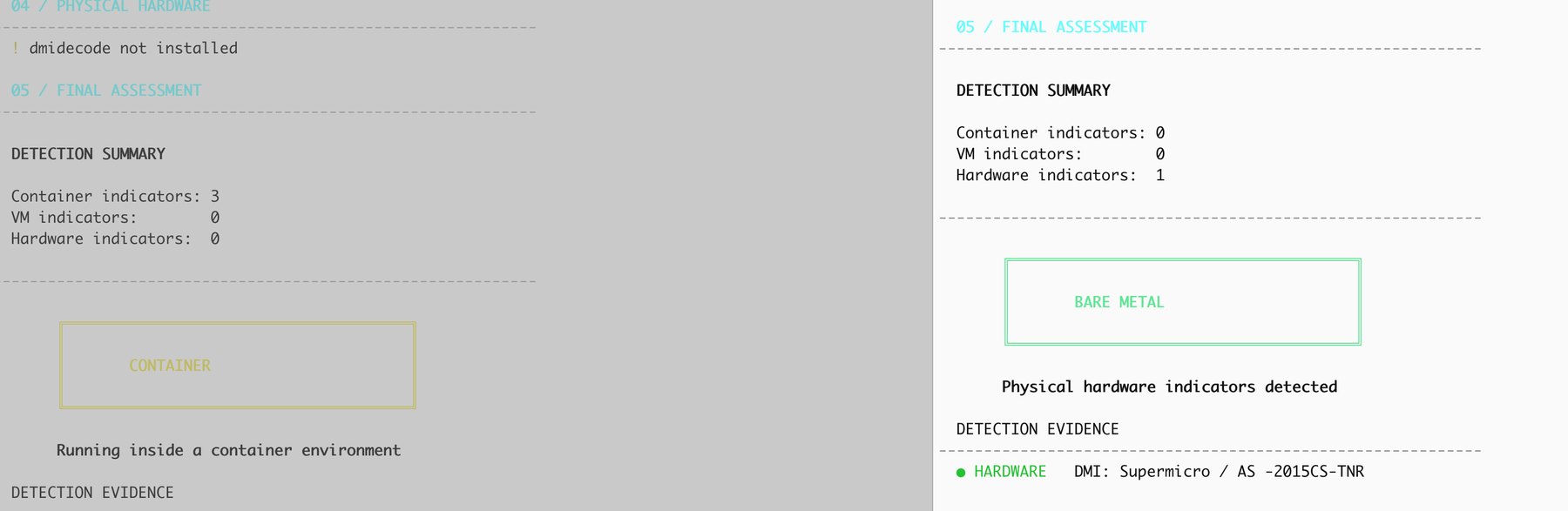
I ran a fuller detection script on both machines side by side. The RunPod Pod reported a Docker container (3 container indicators). The Shadeform machine, which I expected to be a VM, reported bare metal: no VM indicators, and the hardware itself showed up as a Supermicro server. And it was the cheaper of the two.
MIG: split one H100 into seven GPUs
MIG (Multi-Instance GPU) partitions one NVIDIA GPU into several smaller, isolated GPUs (see NVIDIA's MIG user guide for the supported slice profiles). I use it all the time for labs: one H100 becomes seven GPUs, so seven students or instructors each get their own.
On a VM or bare metal, where you control the machine:
sudo nvidia-smi -i 0 -mig 1                          # enable MIG mode
sudo nvidia-smi mig -cgi 19,19,19,19,19,19,19 -C     # 7 slices of about 10 GB each
nvidia-smi -L                                        # now lists 7 MIG devices
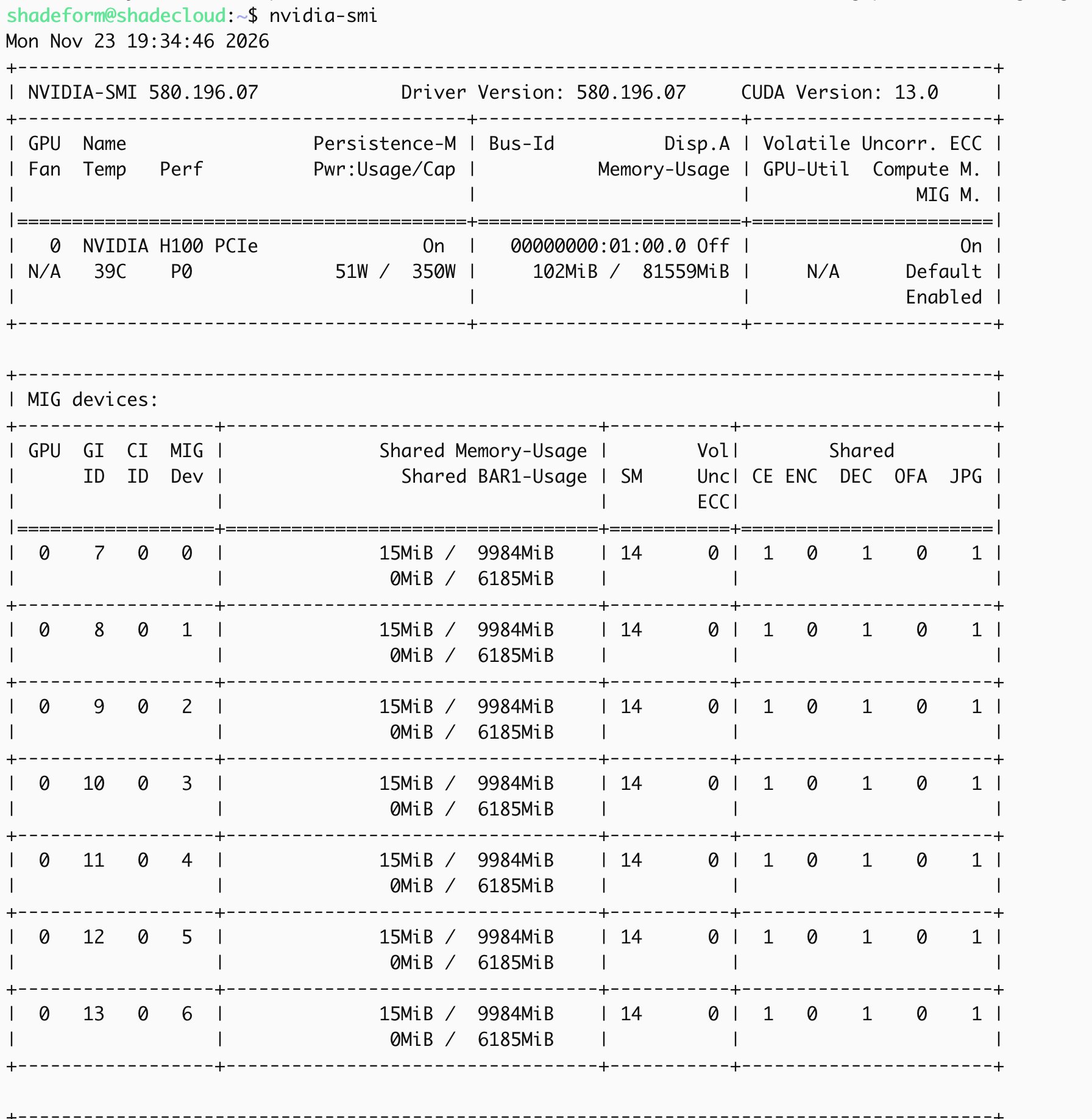
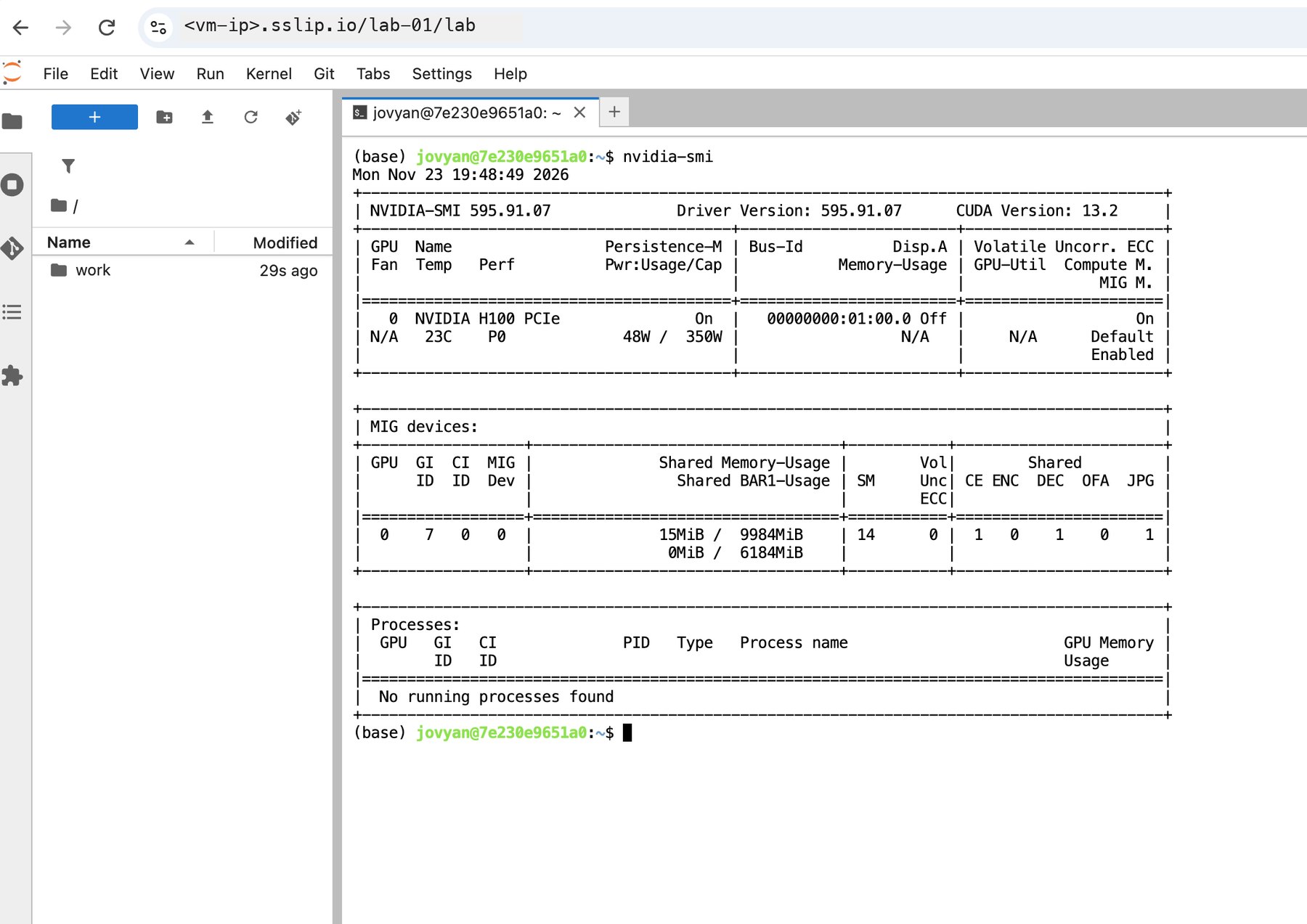
On the bare-metal Shadeform machine, nvidia-smi then showed the H100 PCIe with MIG mode enabled and seven MIG devices, each with about 10 GB of memory:
Inside the RunPod container, the very first command fails:

Containers don't run in privileged mode and don't get full control of the GPU, so even as root inside the container you can't change its mode.
Why MIG isolation matters
In a container you still get the full H100, and you can run as many notebooks or processes on it as you like. The catch is that one process can use all of the GPU memory and starve the others.
With MIG, the limit is enforced in hardware. Each slice is capped, about 10 GB of VRAM in my setup, so one learner's runaway job can't take down everyone else's.
Before a single big training run, switch MIG back off so you get the full GPU:
sudo nvidia-smi mig -dci && sudo nvidia-smi mig -dgi && sudo nvidia-smi -i 0 -mig 0Try this live: free GPU workshop with TorontoAI, Dec 16, 5 PM ET. Everyone gets their own private H100 slice (about 10 GB) and fine-tunes a text-to-SQL model on it. No setup, no cloud account. Reserve your spot on Luma.
Which GPU cloud should you pick?
| You need | Good fit |
|---|---|
| A quick notebook for a solo experiment | A dev container: RunPod Pods or Nebius DevLabs |
| The lowest H100 price, or any GPU that is free now | Shadeform, which compares many providers |
| A full cloud around the GPU: Kubernetes, databases, networking | Nebius |
| Root access, MIG, or labs for many users | A VM or bare metal: Lambda, Shadeform or a Nebius VM |
Running a large model rather than a lab? See what I learned deploying DeepSeek 3.2 Exp on NVIDIA H200.
Launch a GPU instance on any cloud with one command (labagent)
If you are a scrappy developer chasing the best deal, you end up logging into four consoles, managing four sets of SSH keys and clicking through four different launch flows. So I built labagent, a free, open-source CLI that automates all of it.
Install (Mac, Windows or Linux):
pipx install labagent # or: pip install labagentAdd API keys for the clouds you use, such as Shadeform, RunPod, Nebius and Lambda. Each cloud's console lets you create one. For Shadeform, set SHADEFORM_API_KEY or put it in ~/.labagent/credentials.
Use one SSH key everywhere. labagent creates a single key and registers it with each cloud, so you don't juggle separate keys:
labagent compute ssh-key-add --cloud all --name labagentFind H100 deals across clouds, including whether each offer is a container or a VM:
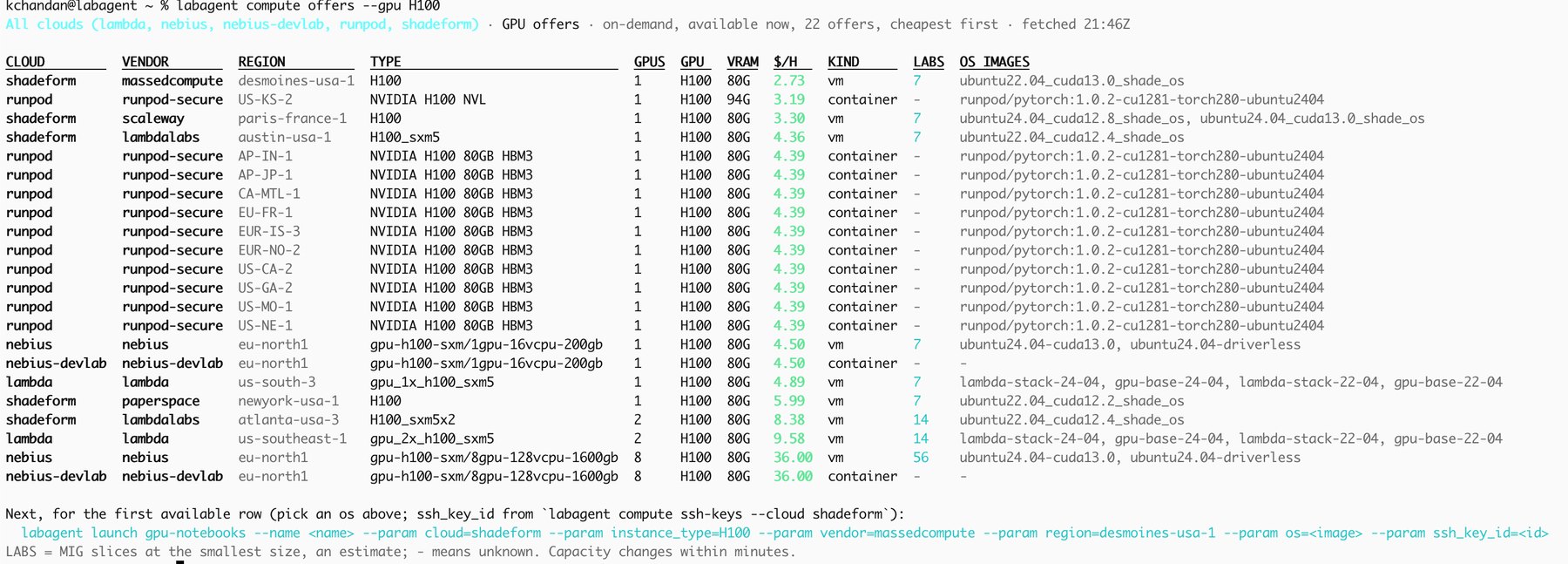
labagent compute offers --gpu H100That one command returned 22 H100 offers across RunPod, Shadeform, Nebius and Lambda, cheapest first, with the price per hour, the kind (vm or container) and how many lab slices MIG would give you:
Launch a GPU lab. The gpu-notebooks pack rents the machine, enables MIG, and starts a JupyterLab on each GPU slice, so seven people get seven notebooks from one H100. Preview it first with --dry-run, which rents nothing:
labagent launch -f examples/launch.shadeform.example.yaml --dry-run
labagent launch -f examples/launch.shadeform.example.yaml
The launch file is short. It names the pack, the cloud and the GPU, and location: any picks the cheapest available H100 behind Shadeform:
pack: gpu-notebooks
name: shadeform-h100
params:
  cloud: shadeform
  instance_type: H100
  location: any          # cheapest available, or pin vendor: and region:
  # max_price: 4         # most you will pay per hour
  mode: mig
In my run, the whole thing took about five minutes: preflight check, create the VM (2m 13s), split the GPU into 7 MIG slices, start one JupyterLab container per slice, then verify that every lab answers, needs its token and sees only its own slice. It ended with a URL and login for each lab, and the cloud auto-deletes the VM after 4 hours as a safety net.
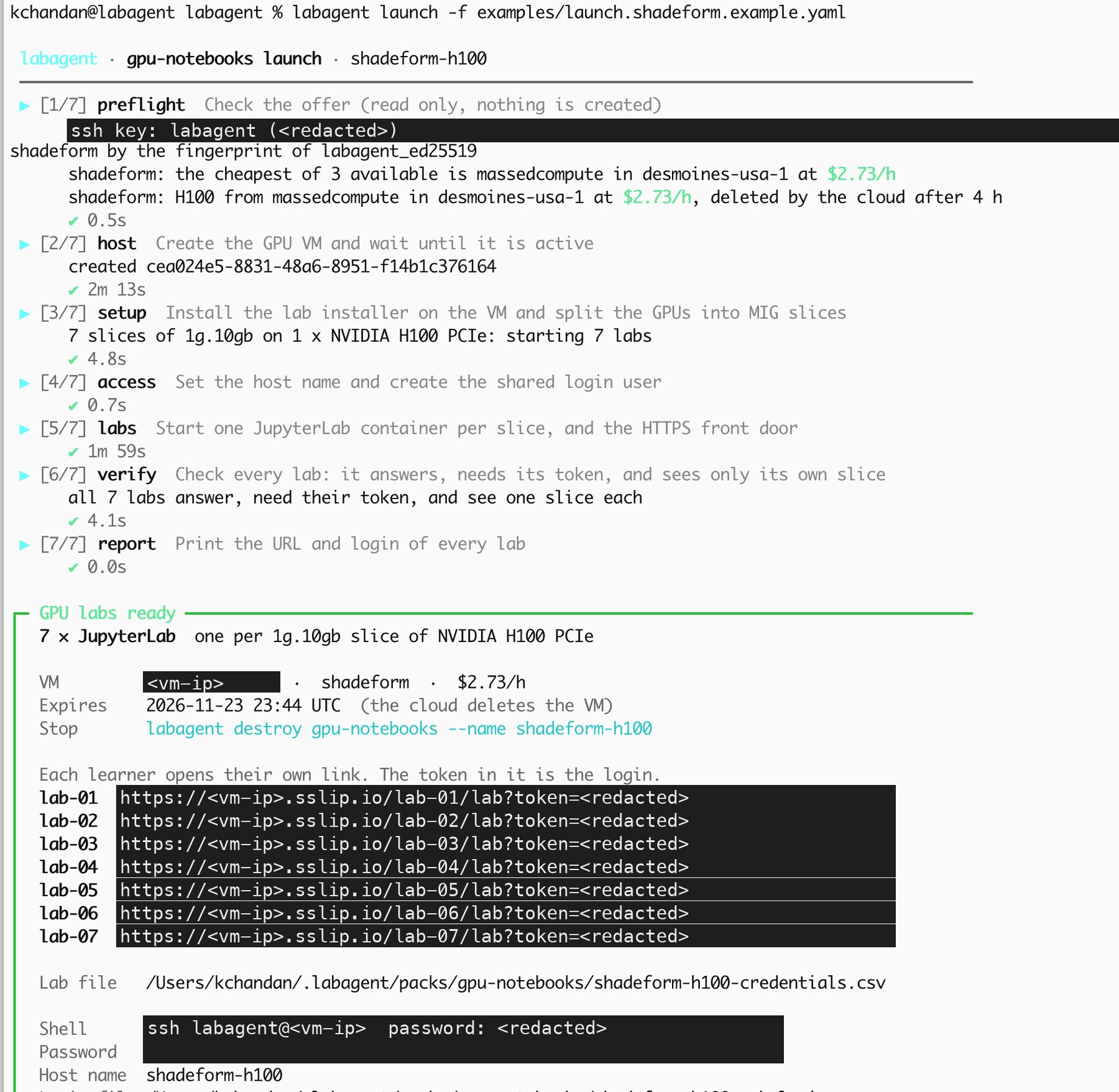
Each learner opens their own link and lands in a JupyterLab that can see exactly one MIG slice:
Tear it all down when you are done, so nothing keeps billing. The same file removes what it created:
labagent destroy -f examples/launch.shadeform.example.yamlThe repo also ships launch files for RunPod, Nebius and Lambda. It runs well from AI coding agents like Claude Code too, because every command returns structured JSON.
Running a bootcamp, class or workshop? We set up GPU labs for your cohort, one isolated GPU slice per learner. See becloudready.com/labs.
I use it to set up labs for bootcamps, hackathons and customer workshops. It is free, I am not selling anything here, and feedback and contributions are welcome. If it saves you a few hours of console clicking, a star on GitHub helps other developers find it.
Next: same fine-tune, four clouds
In part two, I run the same LLM fine-tuning job on these clouds, compare training time and the real bill, and show everything that broke along the way.
GPU provider? Want your platform in the next review or hackathon? Get in touch.
Free tools mentioned:
- labagent: launch GPU labs on any cloud with one command
- GPU Price tracker: nightly H100, H200, B200 and A100 prices across neoclouds
More on GPUs, LLMs and neoclouds
- The Cheapest H100 Is Out of Stock: What 25 Clouds of GPU Pricing Data Shows: how the nightly price tracker works and why stock matters as much as price
- Deploying DeepSeek 3.2 Exp on NVIDIA H200: Learning Lessons: running a frontier-size model on H200 GPUs
- vLLM Benchmarking and LLM Inference Optimization with NVIDIA GenAI-Perf: benchmark your own inference setup once you have a GPU
- Running DeepSeek R1 on Denvr Cloud with H100 GPUs: another neocloud, another H100 walkthrough
- Infrastructure Monitoring: Traditional vs. AI/GPU Cloud Environments: what to monitor once the GPU is running
About the author
Chandan Kumar is the founder of beCloudReady and an organizer of TorontoAI, a 10K+ member AI community in Toronto. He builds hands-on cloud, data and AI labs and still writes the code, including the open-source labagent. Connect on LinkedIn.
Frequently asked questions
What is the cheapest way to rent an H100 in 2026?
In my test, a GPU marketplace was cheapest: the best available H100 on Shadeform was $2.73/hr, against $4.39 to $4.51/hr on RunPod and Nebius and $3.79/hr for an H100 PCIe on Lambda. Prices change daily, so compare before you launch. The GPU Price tracker shows nightly prices across neoclouds, and labagent compute offers --gpu H100 does a live comparison in one command.
Is RunPod a VM or a container?
RunPod Pods are containers. They start fast and include JupyterLab, but you can't change GPU settings such as MIG mode.
What is the difference between a GPU container and a GPU VM?
A container shares the host and runs without privileged access to the GPU. A VM, or bare metal, gives you the whole machine, so you can configure the GPU, install drivers and enable MIG.
Can I partition an H100 into multiple GPUs?
Yes, with NVIDIA MIG: up to seven isolated slices of about 10 GB each. You need a VM or bare-metal machine with root access. It won't work inside a standard container.
Does Lambda keep my data after I delete an instance?
Only if you attached a filesystem. Without one, everything on the instance is gone when you delete it.
What is a neocloud?
A neocloud is a cloud provider built around GPUs for AI workloads, such as RunPod, Nebius, Lambda and CoreWeave, as opposed to a general-purpose hyperscaler like AWS, Azure or GCP. Some, like Shadeform, are marketplaces that resell capacity from several of them.
Get monthly GPU price updates.
Neocloud H100 and A100 price moves and new GPU lab guides, once a month. Free, no spam.