Hands-on DataOps with Databricks, Terraform & GitHub Actions
A step-by-step guide to automating Databricks deployments using Infrastructure-as-Code — Terraform modules, Spark jobs, and GitHub Actions CI/CD.
A Step-by-Step Guide to Automating Databricks Deployments Using Infrastructure-as-Code
Why DataOps + DevOps for Databricks?
As teams scale their cloud-native data platforms, automation and reproducibility become essential. Manual provisioning and notebook execution just don't cut it anymore.
That's where Infrastructure as Code (IaC) and CI/CD come in.
In this post, we walk through a real-world automation pipeline that:
- Provisions Azure Databricks using Terraform
- Manages ETL notebooks and jobs
- Automates scheduling using GitHub Actions
Whether you're just getting started or already running Spark jobs in production, this guide helps you think like a platform engineer while working with data tools.
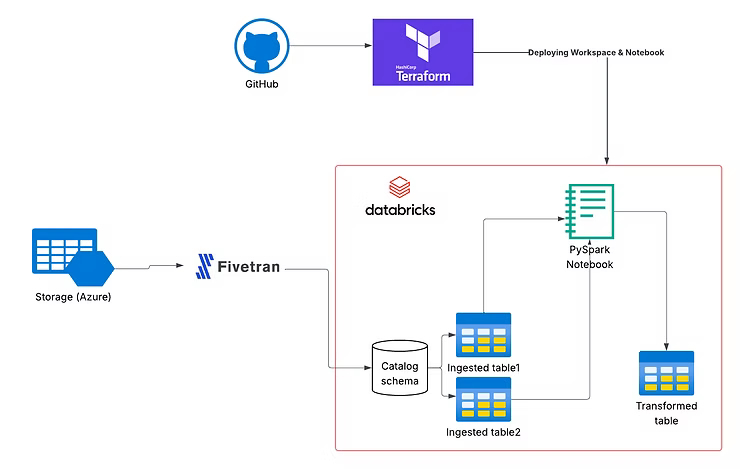
Architecture Overview
Key Components
- Terraform modules for reusable infrastructure
- Azure (Databricks, Resource Groups, VNets)
- GitHub Actions for automation
- Databricks Jobs API for orchestration
- Fivetran (optional for ingestion)
Modular Terraform Setup for Azure Databricks
We created two major layers:
1. infra/: Core Infrastructure
Includes:
- Resource Group
- Virtual Network
- Azure Databricks Workspace
- Network Security Groups
module "databricks_workspace" {
  source                      = "../../../modules/databricks_workspace"
  workspace_name              = "${local.prefix}-workspace"
  resource_group_name         = var.resource_group_name
  region                      = var.region
  managed_resource_group_name = "${local.prefix}-managed-rg"
  vnet_id                     = module.network.vnet_id
}
2. apps/: Jobs, Notebooks, and Workflows
We created a Spark job and uploaded it as a Databricks notebook:
resource "databricks_notebook" "nightly_job_notebook" {
  path           = "/Shared/nightly_task"
  language       = "PYTHON"
  content_base64 = base64encode(file(var.notebook_file_path))
}
Job Definition
resource "databricks_job" "nightly_serverless_job" {
  name = "Nightly Python Job - Serverless"

  notebook_task {
    notebook_path = databricks_notebook.nightly_job_notebook.path
  }

  schedule {
    quartz_cron_expression = "0 0 * * * ?"
    timezone_id            = "UTC"
  }

  job_cluster {
    job_cluster_key = "serverless_cluster"

    new_cluster {
      spark_version  = "13.3.x-scala2.12"
      runtime_engine = "PHOTON"
      num_workers    = 1
    }
  }
}
GitHub Actions CI/CD for Terraform
name: Deploy Databricks Infra

on:
  push:
    paths:
      - 'apps/**'
      - 'infra/**'
  workflow_dispatch:

jobs:
  deploy:
    runs-on: ubuntu-latest

    steps:
      - uses: actions/checkout@v3

      - name: Setup Terraform
        uses: hashicorp/setup-terraform@v3

      - name: Terraform Init
        run: terraform init

      - name: Terraform Apply
        run: terraform apply -auto-approve
This enables automatic or manual deployments on infra/app changes.
Testing with Databricks Community Edition
- Create a free Databricks Community Edition account
- Run jobs and notebooks without Azure billing
- Sync code using GitHub or
databricks-cli
What You'll Walk Away With
- Deploy Azure Databricks workspaces using Terraform
- Structure infra and application layers cleanly
- Manage Spark jobs and workflows as code
- Automate everything using GitHub Actions
What's Next?
Repository: azure-databricks-terraform on GitHub
Upcoming Topics
- Secure secret management (Key Vault + Databricks secrets)
- Advanced CI/CD pipelines
- Integrating Fivetran, dbt, and Unity Catalog
- Multi-environment (dev/staging/prod) strategies