Introduction to AWS: Console, Regions & IAM
AWS Data Engineer Roadmap
Sign in, lock down your region, and see how an IAM role's trust relationship actually works — the orientation every later lab assumes.
Chapter 1 of 6 — AWS Data Engineer Roadmap
This is the first chapter in the AWS Data Engineer Roadmap — a free, hands-on path through the AWS services that show up in almost every real data platform. Before touching S3, Glue, or Athena in Chapter 2, you need five minutes of orientation: where you're signing in, why the region matters, and what an IAM role actually is once you click into one.
Time: ~10 minutes.
What your instructor gave you
If you're following along live with beCloudReady (in a free session or the AI Cloud Engineer Bootcamp), you were handed three things ahead of time:
| Value | |
|---|---|
| Console URL | https://<ACCOUNT_ID>.signin.aws.amazon.com/console |
| Username | your full email, e.g. suresh-raina@quicklabs.internal |
| Password | (one-time, you'll change it on first login) |
| Region | us-west-2 (Oregon) — anything else is denied |
If you're working solo on your own AWS account instead, swap these for your own console URL, IAM user, and a region of your choice — the orientation steps below are identical either way.
1.1 Sign in
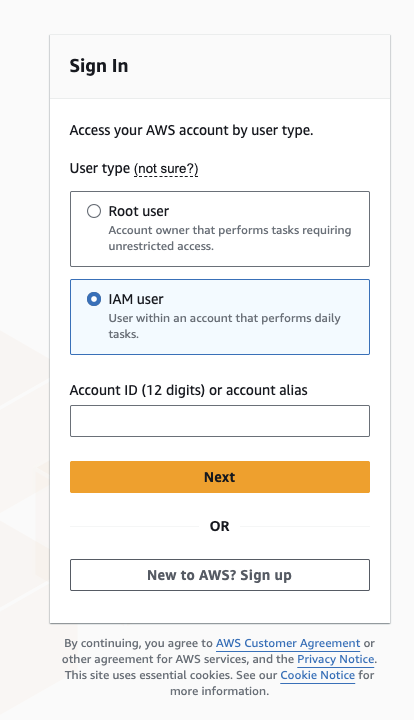
- Open the console URL above in an incognito/private browser window.
- Sign in with your username and one-time password, then set a new password when prompted.
1.2 Set your region
Top-right region picker → Oregon (us-west-2). In a shared sandbox, your policy denies every other region — skip this and every page from here on will look broken or empty.
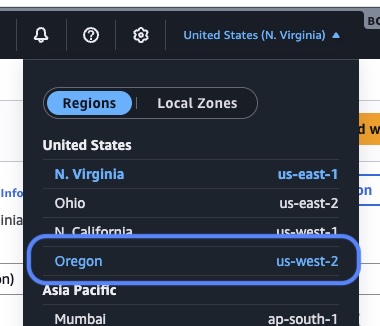
Sanity check: top-right shows your full username (your email, e.g. suresh-raina@quicklabs.internal) @ <ACCOUNT_ID> and the region reads Oregon.
🤖 Ask AI — Regions and Availability Zones
Explain AWS Regions and Availability Zones in plain English: what's the
difference, why does a console session get "locked" to one region, and
what actually breaks if I'm in the wrong region when a resource (like an
S3 bucket or IAM role) was created in another one?
1.3 Confirm what's already there
In an instructor-led sandbox, you start with nothing except your login and a couple of things you didn't create yourself — most commonly a service role that a later AWS service (like Glue) will assume on your behalf.
IAM → Roles → search for the role name your instructor gave you. Click in and open the Trust relationships tab. This is the part most people skip, and it's the part that actually matters: a trust policy is what lets a specific AWS service — and only that service — assume the role and act with its permissions. It's the difference between "this role has permissions" and "this role can be used by anything."
🤖 Ask AI — what a trust relationship actually does
In AWS IAM, what is a role's "trust policy" / "trust relationship," and
how is it different from the permissions policy attached to the same
role? Use a concrete example: a Glue service role that only AWS Glue
(and nothing else) is allowed to assume.
Why this matters before you touch any data service
Every lab in this roadmap — Glue, Athena, Lake Formation, Lambda — runs as an IAM role, not as you. Five minutes spent actually reading a trust policy now saves an hour of AccessDenied debugging later, because almost every permission error in AWS data engineering traces back to one of two things: the wrong region, or a role that isn't trusted to do what you're asking it to do.
Next: build an AWS data lake
You're oriented. Chapter 2 puts this to work: you'll create S3 buckets by hand, build a Glue Data Catalog, run crawlers, write an ETL job that converts CSV to Parquet, and query all of it with Athena — a complete, working data lake, built piece by piece in the console.
I publish new labs every week.
Get them in your inbox — free, no spam.
Want your team hands-on with this in a day? We run this as an instructor-led team workshop.
Explore team workshops